
Tech Partner Hosted Embed Sign up flow
The feature is currently in beta mode and is only available to select partners.
Objective
As a Tech Provider, you can work with a Solution Provider (Such as Gupshup) to jointly create a solution that allows you and the Solution Partner to jointly manage your customer’s WhatsApp assets. With this joint solution, either the Solution Partner or the Tech Provider can host the embedded Signup on their individual portals for the customers to complete the WhatsApp Business Account (WABA) onboarding process.
This guide is intended for partners who want to host an Embedded Signup flow on their own portal after registering as Tech Provider with Meta
Prerequisites
- Register as a Tech provider with Meta.
- Create a joint solution with the Gupshup.
- Register as a Tech provider with the Gupshup partner portal, and create a new wallet.
- Configure Embedded signup with the joint Solution ID generated in step 2.
- Complete a new onboarding with the above configured embedded signup.
NOTE:Post embedded sign-up completion partners or Partner’s customer should not:
- Register the WABA using the registration API.
- Gupshup will handle the registration process as per the onboarding flow when the partner calls the App linking API.
- Enable and set 2FA.
The 3 steps to be followed by the partner are listed below:
Step 1: Link an App
This API creates a Gupshup app, maps the WABA created with the Gupshup app, and attaches the Gupshup credit line to the WABA. The phone number passed by the partner is mapped to the WABA. Additionally, partners can also pass the optional callback URL (they wish to map with the WABA).
Partners will need to call the following APIs to link WABA ID and Phone number and get the status of Gupshup Apps.
Parameters
| Key | Value | Mandatory/Optional | Description | Constraint |
|---|---|---|---|---|
| Authorization | {{PARTNER_TOKEN}} | JWT Token issued post partner login | ||
| name | Mandatory | Gupshup app name which is to be created | - Should be between 6 - 150 characters. - Should not conflict with any other Gupshup App. - Special Characters are not allowed. | |
| wabaId | Mandatory | Live WABA ID | String | |
| phone | Mandatory | Phone number to be linked with the WABA | String | |
| callbackUrl | Optional | Callback URL to be mapped with the WABA | String |
Request
curl --request POST --location '{{PARTNER_URL}}/partner/tpp/app' \
--header 'Authorization: <PARTNER_TOKEN>' \
--header 'Content-Type: application/x-www-form-urlencoded' \
--data-urlencode 'name={{appName}}' \
--data-urlencode 'wabaId={{wabaId}}' \
--data-urlencode 'phone={{phoneNumber}}' \
--data-urlencode 'callbackUrl={{callbackUrl}}' (optional)
Response
| Status Code | Response | Comments |
|---|---|---|
| Success | ||
| 200 | { "status" : "success", "appId": "\<app_id>" } | |
| Error | ||
| 409 | { "status": "error", "message": "Bot Already Exists" } | When already a bot with the same name exists in Gupshup |
| 400 | { "status": "error", "message": "Invalid characters used in app name" } | When a Special character is added to a name. |
| 400 | { "status": "error", "message": "App name should be between 6 to 150 characters in length" } | if the App name is not provided or the App name length is less than 6 or more than 150 characters. |
| 429 | { "status": "error", "message": "Too Many Requests" } | 10 Requests per Minute |
| 500 | { "status": "error", "message": "Unable to create App" } | For any Internal Error |
Step 2: Get Partner App Token
This API fetches the <<glossary:Partner app token>> against the <<glossary:Partner token>>.
Parameters
| Key | Value | Description |
|---|---|---|
| Authorization | {{PARTNER_TOKEN}} | JWT Token issued post partner login |
Request
curl --location '{{PARTNER_URL}}/partner/app/:appId/token' \
--header 'Authorization: <PARTNER_TOKEN>'
Response
{
  "name": "Partner_Name",
  "terms_read": true,
  "token": "{{token}}"
}
Step 3: Get Status
This API fetches the status of the Gupshup app creation and the underlying processes, as detailed in the link to app API.
Parameter
| Key | Value | Description |
|---|---|---|
| Authorization | {{PARTNER_APP_TOKEN}} | Access Token for the application |
Request
curl --location '{{PARTNER_URL}}/partner/app/:appId/pipeline' \
--header 'Authorization: {{PARTNER_APP_TOKEN}}'
Status Codes
| Status Code | Response | Comment |
|---|---|---|
| Success | ||
| 200 |
{
"status": "success",
"whatsapp": {
"countryCode": "
|
|
| Error | ||
| 200 |
{
"status": "success",
"whatsapp": {
"countryCode": "
|
In case of an error, the pipeline retries three times before failing. |
| 400 |
{
  "status": "error",
  "message": "Please review the request parameters and retry"
}
|
Validate request parameters or authorization token. |
| 429 |
{
  "status": "error",
  "message": "Too Many Requests"
}
|
Limit: 10 requests per second. |
| 500 |
{
  "status": "error",
  "message": "Internal server error. Please try again later. If the issue persists, contact Gupshup Dev Support."
}
|
Occurs in case of internal server errors. |
Step 4: Subscription API
NoteThis API should be called after the app is successfully linked with Gupshup and is marked live.
Our recommendation is to set a callback during app creation and only set subscription once the live event is received from Gupshup.
Parameters
| Key | Value | Mandatory/Optional | Description | Constraint |
|---|---|---|---|---|
| Authorization | {{PARTNER_APP_TOKEN}} | Access Token for the application | ||
| modes | Mandatory | Stages in subscription processing | - Should be one of the following: NONE, READ, DELIVERED, SENT, DELETED, OTHERSfor version 3 TEMPLATE, ACCOUNT, COPY are not supported | |
| tag | Mandatory | Name tag for URL | tag must be unique and mandatory for each app | |
| url | Mandatory | Callback URL | Should be valid URL | |
| version | Mandatory | Version | Should be one of the following : 0,1,2,3 | |
| showOnUI | Optional | Used internally | Default value is false |
Request
curl --location 'https://partner.gupshup.io/partner/app/bf9ee64c-3d4d-4ac4-8668-732e577007c4/subscription' \
--header 'Content-Type: application/x-www-form-urlencoded' \
--header 'Authorization: {{partner_app_token}}' \
--data-urlencode 'modes=SENT,ENQUEUED,DELIVERED,READ,DELETED,MESSAGE, OTHERS' \
--data-urlencode 'tag=V3 Subscription' \
--data-urlencode 'showOnUI=false' \
--data-urlencode 'version=3' \
--data-urlencode 'url=https://webhook.site/0b092322-b55b-419e-9c74-eb92f2b38553'
Status Codes
| Status Code | Response | Comments |
|---|---|---|
| Success | ||
| 200 | { "status": "success", "subscription": { "active": true, "appId": "bf9ee64c-3d4d-4ac4-8668-732e577007c4", "createdOn": 1705574838954, "id": "8166", "mode": 2047, "modifiedOn": 1705574838954, "showOnUI": false, "tag": "V3 Subscription", "url": "<https://webhook.site/0b092322-b55b-419e-9c74-eb92f2b38553">, "version": 3 } } | |
| Error | ||
| 400 | { "status": "error", "message": "Invalid URL Passed" } | The URL is not valid |
| 401 | { "status": "error", "message": "Authentication Failed" } | When authentication fails |
| 429 | { "status": "error", "message": "Too Many Requests" } | When the rate limit is exceeded |
| 500 | { "status": "error", "message": "Unable To Create Subscription" } | When error occurred while creating the subscription |
Appendix
Creating Joint Solutions
Contact your Gupshup CSM and work together to determine:
- A solution name: The solution name should be agreed upon by both you and Gupshup to ensure it is distinguishable from other solutions.
- Details needed for Initiating Solution Request Gupshup recommends that Tech Providers initiate the solution request with Gupshup app ID, i.e. 2281283925530161.
- Partner Portal Setup for Tech Provider Once you have an approved solutionID, sign up as a partner on the Gupshup partner portal, providing your solution ID. If you are already registered with us on the partner portal, existing ISVs can add their solution details from the settings screen.
- Anything else, such as service level agreements, services provided, billing processes, etc. This decision will be made jointly by you and Gupshup based on your agreements with Meta.
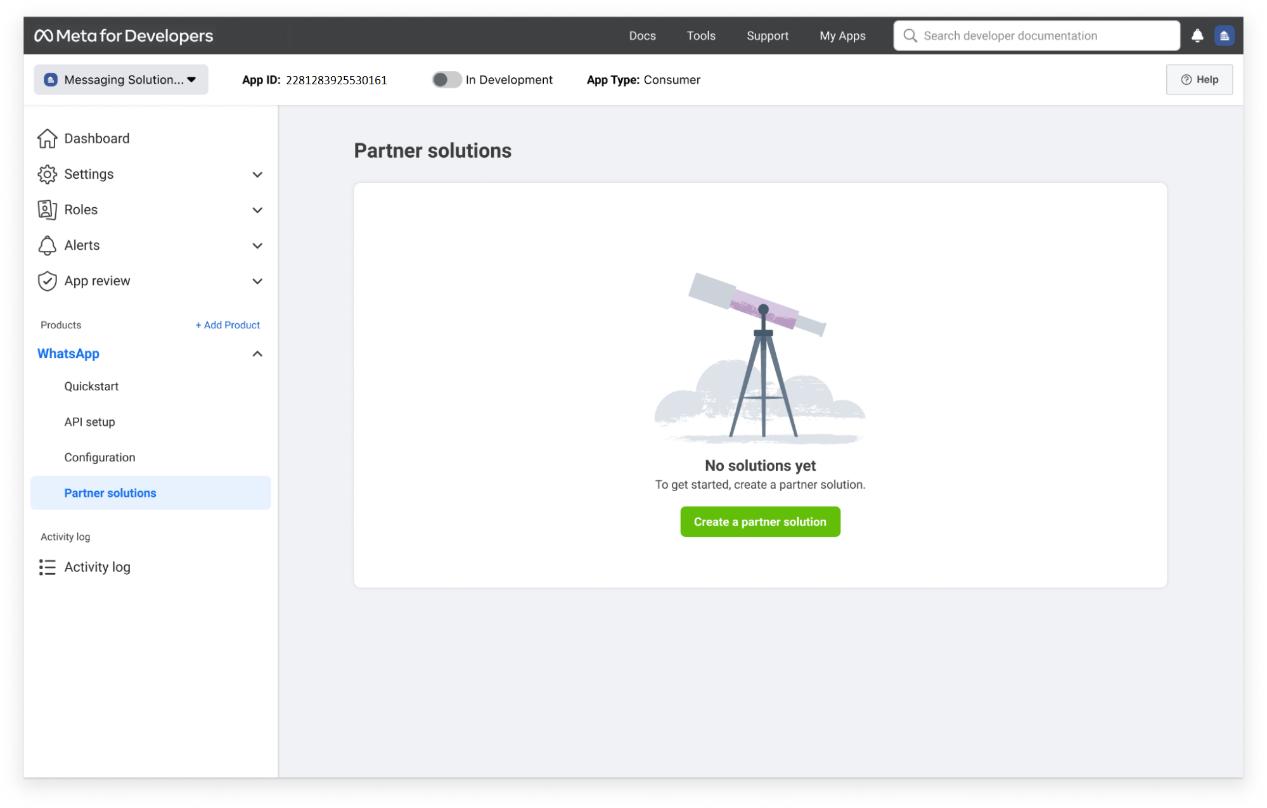
- Navigate to the App Dashboard > WhatsApp > Partner Solutions panel and click the Create a Partner Solution button.
- Fill in the Solution name and Gupshup’s app ID(2281283925530161) in the partner app ID in the screen below:
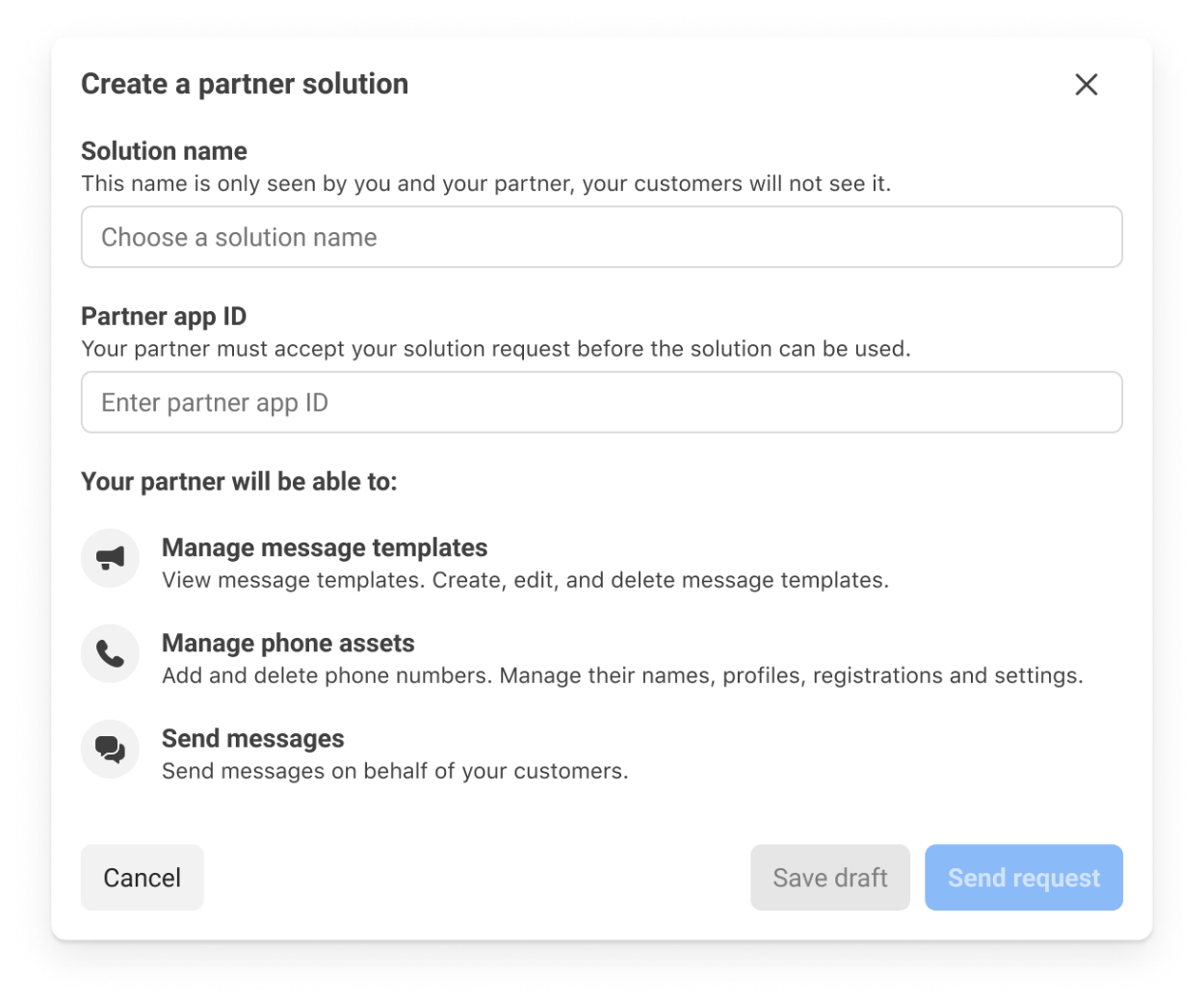
- The solution will be displayed in the solutions panel as Pending until Gupshup accepts it.
- Upon approval, the request will be designated as Active. Confirm with your CSM that Gupshup has accepted the solution request (solution status must be Active in the Meta App Dashboard).
- In the event of rejection, the request will be marked as Inactive. In case Gupshup rejects your solution request, please reach out to your CSM, understand the rejection reasons, and resubmit a fresh solution request, post addressing your rejection reasons.
Live Event
Live event payload
{
  "app": "<App Name>",
  "appId": "<App UUID>",
  "phone": "<App Phone Number>"
  "timestamp": 1636986446609,
  "version": 2,
  "type": "onboarding-event",
  "payload": {
    "type" : "docker-status-event",
    "payload" :{
       "status": "live"
       "waId" : "<Phone Number as on Whatsapp>"
    }
  }
}
Updated about 1 year ago