
Guide to Voice Outbound (Business-initiated Calls) & SIP Integration via Gupshup
Business-initiated calling is available in all locations where the Cloud API is supported, except the following countries:
- USA
- Canada
- Egypt
- Vietnam
- Nigeria
Note:
- The business phone number’s country code must be from a supported country.
- The consumer phone number can be from any country where the Cloud API is available.
Prerequisites
Before you begin, ensure that Gupshup (GS-SIP) Inbound Calling is enabled for your account. This is mandatory for successful SIP call routing to our platform. The whatsapp user should have permission to receive call. **Refer **
Important
Outbound WhatsApp Voice is NOT standard SIP dialing.
Before sending a SIP INVITE, you MUST follow the steps below:
Call Flow
- Send a Call Permission Request.
- Wait for the APPROVE webhook.
- Only after receiving the APPROVE webhook, send the SIP INVITE.
Application
    |
    v
Send Call Permission Request
    |
    v
User Receives Call Permission Prompt
    |
    v
User Clicks Approve
    |
    v
Receive APPROVE Webhook
    |
    v
Send SIP INVITE
    |
    v
180 Ringing
    |
    v
200 OK
    |
    v
Call Connected
Why This Is Important
WhatsApp Voice requires explicit user approval before a business can initiate a voice call. Sending a SIP INVITE before receiving the APPROVE webhook can lead to unexpected behavior and call failures.
Common Issues
Failure to follow the above flow may result in:
- SIP 408 Timeout
- SIP 500 Errors
- Long Post Dial Delay (PDD)
- Delayed Audio
- Ghost Calls
- Call Setup Failures
Troubleshooting Checklist
Before raising a support ticket, verify that:
- A call permission request was sent successfully.
- The user approved the request.
- The APPROVE webhook was received by your application.
- The SIP INVITE was sent only after receiving the APPROVE webhook.
- Required IPs are whitelisted.
- SIP and media connectivity are functioning correctly.
Note: The SIP INVITE should never be sent before receiving the APPROVE webhook.
1. Product Overview
WhatsApp Voice Outbound lets your platform originate voice calls to WhatsApp users via Gupshup’s SIP edge and Meta’s Cloud API.
The flow combines:
- Partner SIP Origination → Gupshup SIP (TLS)
- WhatsApp Call Permission & Call Control via Cloud API
High-level lifecycle
- Collect call permission from the WhatsApp user (required before every business-initiated call, with an expiration).
- Originate SIP INVITE to Gupshup’s SIP edge with required authentication headers.
- Gupshup initiates the WhatsApp call, negotiates SDP, and relays status updates.
- Media flows once the user accepts.
- Terminate the call from either side and capture metrics from termination/billing events.
If a call is attempted without user permission, the platform returns a specific error (e.g.,
138006).
2. Key Capabilities & Benefits
- WhatsApp-native calling with explicit end-user consent.
- Standards-based SIP over TLS (5061) easy to integrate from any SBC/softswitch.
- Clear call state webhooks (ringing/accepted/rejected/terminate) for reliable automation.
- Granular metrics at termination (duration, timestamps) to power accurate billing.
- Secure-by-default: TLS signaling, IP allowlisting, and controlled media ports.
- Fast time-to-value with a crisp test endpoint and sample SIP transcripts.
3. Architecture & Call Flow
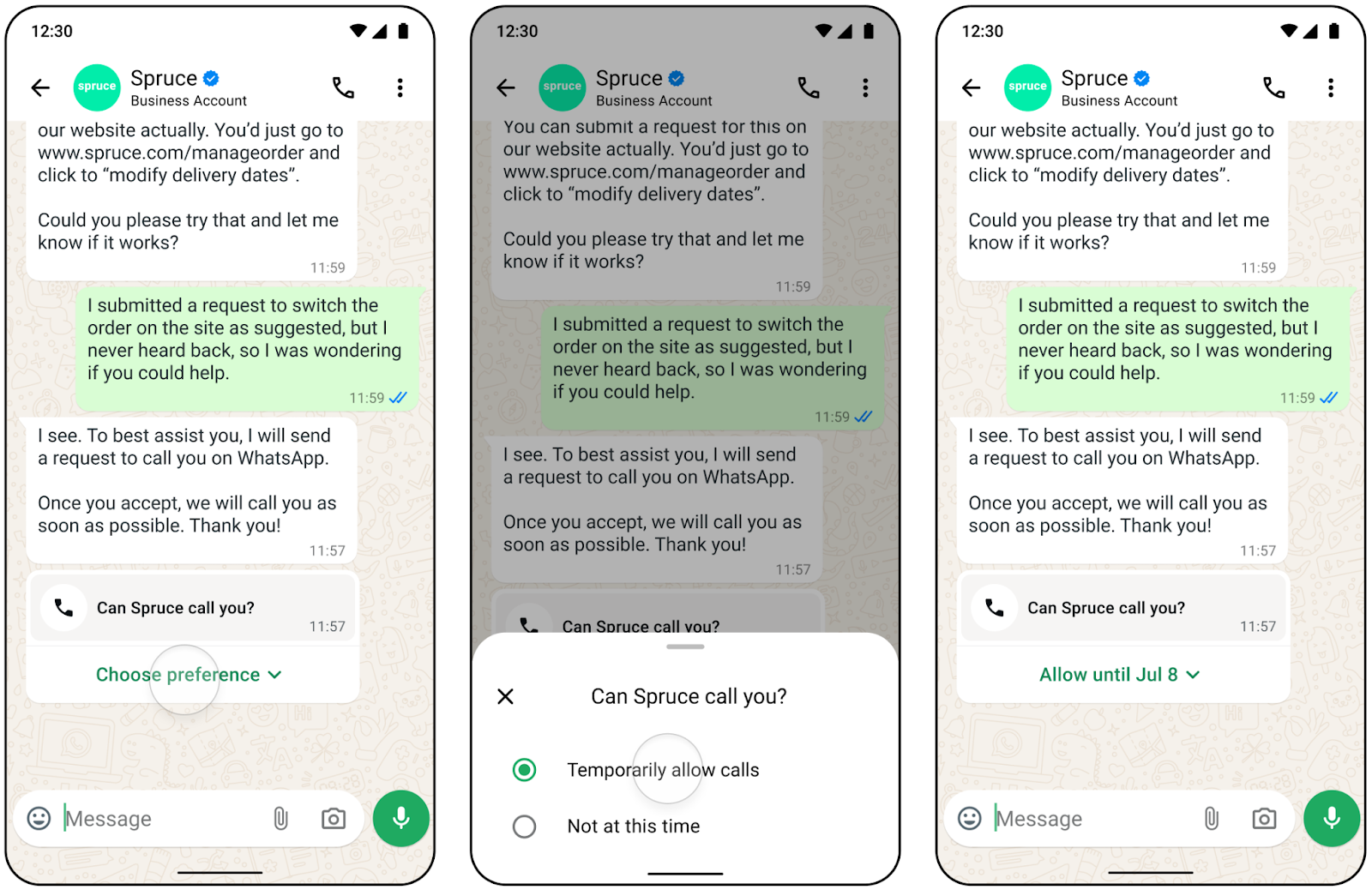
Call Permission Flow (WhatsApp)
Step A — Request permission (Session V3 Passthrough)
{
  "messaging_product": "whatsapp",
  "recipient_type": "individual",
  "to": "{consumer-phone-number}",
  "type": "interactive",
  "interactive": {
    "type": "call_permission_request",
    "action": { "name": "call_permission_request" }
  }
}
*Step B — Consumer approval webhook (subscribe to Messaging mode)
{
  "object": "whatsapp_business_account",
  "entry": [{
    "id": "{phone-number-id}",
    "changes": [{
      "value": {
        "messaging_product": "whatsapp",
        "contacts": [{ "wa_id": "{consumer-phone-number}" }],
        "messages": [{
          "interactive": {
            "type": "call_permission_reply",
            "call_permission_reply": {
              "response": "Accept",
              "expiration_time": "{timestamp}"
            }
          },
          "type": "interactive"
        }]
      },
      "field": "messages"
    }]
  }]
}{
"messaging_product": "whatsapp",
"calls": [{ "id": "wacid.ABGGFjFVU2AfAgo6V" }]
}Sample Hang-Up Messages
Connected Call
INVITE sip:[email protected]:5061;transport=tls SIP/2.0
Via: SIP/2.0/TLS 15.206.90.40:5081;rport;branch=z9hG4bKt24B4S38yU7Ze
Max-Forwards: 69
From: "1001" <sip:[email protected]>;tag=vUgB33cH1NB2B
To: <sip:[email protected]:5061;transport=tls>
Call-ID: dcf0abf0-fce7-123e-0bb0-0afc445caa99
CSeq: 103540878 INVITE
Contact: <sip:[email protected]:5081;transport=tls>
User-Agent: Gupshup
Allow: INVITE, ACK, BYE, CANCEL, OPTIONS, MESSAGE, INFO, UPDATE, REGISTER, REFER, NOTIFY
Supported: timer, path, replaces
Allow-Events: talk, hold, conference, refer
Content-Type: application/sdp
Content-Disposition: session
Content-Length: 367
X-PARTNER-APP-TOKEN: sk_xxxxx
X-PARTNER-ID: 2675
X-FS-Support: update_display,send_info
Remote-Party-ID: "1001" <sip:[email protected]>;party=calling;screen=yes;privacy=off
Limit reached
SIP/2.0 400 Bad Request - Business Initiated Calls Limit Hit
Via: SIP/2.0/TLS 15.206.90.40:5081;rport=27879;branch=z9hG4bKeBKNQtH0BmQKc
Max-Forwards: 68
From: "1001" <sip:[email protected]>;tag=1mUpN05cXZ5ap
To: <sip:[email protected]:5061;transport=tls>;tag=NNZmyZa1192FK
Call-ID: 61697d95-08ce-123f-0bb0-0afc445caa99
CSeq: 104195112 INVITE
User-Agent: Gupshup
Allow: INVITE, ACK, BYE, CANCEL, OPTIONS, MESSAGE, INFO, UPDATE, REGISTER, REFER, NOTIFY
Supported: timer, path, replaces
Allow-Events: talk, hold, conference, refer
Reason: Q.850;cause=41;text="NORMAL_TEMPORARY_FAILURE"
Content-Length: 0
X-FS-Display-Name: Outbound Call
X-FS-Display-Number: sip:[email protected]
Remote-Party-ID: "Outbound Call" <sip:[email protected]>;party=calling;privacy=off;screen=no
Duplicate call
SIP/2.0 486 Busy Here - Duplicate Call
Via: SIP/2.0/TLS 15.206.90.40:5081;rport=27879;branch=z9hG4bK8mU0crcBXyH3p
Max-Forwards: 68
From: "1001" <sip:[email protected]>;tag=Uy31ay0Qea0tg
To: <sip:[email protected]:5061;transport=tls>;tag=FZ7ZKX5BKmXZD
Call-ID: e2ce08e6-08cd-123f-0bb0-0afc445caa99
CSeq: 104195006 INVITE
User-Agent: Gupshup
Allow: INVITE, ACK, BYE, CANCEL, OPTIONS, MESSAGE, INFO, UPDATE, REGISTER, REFER, NOTIFY
Supported: timer, path, replaces
Allow-Events: talk, hold, conference, refer
Reason: Q.850;cause=17;text="USER_BUSY"
Content-Length: 0
X-FS-Display-Name: Outbound Call
X-FS-Display-Number: sip:[email protected]
Remote-Party-ID: "Outbound Call" <sip:[email protected]>;party=calling;privacy=off;screen=no
SIP Integration (Partner ↔ Gupshup)
Prerequisites
- Ensure Gupshup (GS-SIP) Inbound Calling is enabled on your account.
- WhatsApp users must have granted call permission.
Server Details
| Parameter | Value |
|---|---|
| SIP Server (Domain) | partner-sip.gupshup.io |
| SIP Port | 5061 |
| Transport | TLS |
| Protocol | SIP/2.0 |
Authentication & Required Headers
- APP-ID in SIP From hea
From: <sip:PARTNER-APP-ID@IP-or-HOST>;tag=<unique-tag>- Custom headers (in every INVITE):
- X-PARTNER-APP-TOKEN:
tokenX-PARTNER-ID:id
Calls without these will be rejected.
Sample SIP INVITE
INVITE sip:[email protected]:5061;transport=tls SIP/2.0
Via: SIP/2.0/TLS 15.206.90.40:5081;rport;branch=z9hG4bKt24B4S38yU7Ze
Max-Forwards: 69
From: "1001" <sip:[email protected]>;tag=vUgB33cH1NB2B
To: <sip:[email protected]:5061;transport=tls>
Call-ID: dcf0abf0-fce7-123e-0bb0-0afc445caa99
CSeq: 103540878 INVITE
Contact: <sip:[email protected]:5081;transport=tls>
User-Agent: Gupshup
Allow: INVITE, ACK, BYE, CANCEL, OPTIONS, MESSAGE, INFO, UPDATE, REGISTER, REFER, NOTIFY
Supported: timer, path, replaces
Allow-Events: talk, hold, conference, refer
Content-Type: application/sdp
Content-Disposition: session
Content-Length: 367
X-PARTNER-APP-TOKEN: sk_xxxxx
X-PARTNER-ID: 2675
X-FS-Support: update_display,send_info
Remote-Party-ID: "1001" <sip:[email protected]>;party=calling;screen=yes;privacy=off

SDP OMITTED FOR BREVITY
Media Specifications
- Codec: Opus/48000 (mandatory)
- RTP: standard RTP media; ptime: 20 ms
Security
- SIP over TLS on 5061 is mandatory.
Network & Firewall
- SIP signaling: TCP 5061
- RTP media: UDP 30000–40000
- Whitelist: 166.117.124.43, 76.223.74.49, partner-sip.gupshup.io
Test Endpoint
- Place a test call to:
sip:<whatsapp-number>@partner-sip.gupshup.io:5061;transport=tlsEnd-to-End Call Flow (SIP ⇄ WhatsApp)
PARTNER (SIP App)       SIP Server (gupshup.io)          WhatsApp User
      |                          |                             |
      | INVITE (APP-ID + headers)|                             |
      |------------------------->|                             |
      |          100 Trying      |                             |
      |<-------------------------|                             |
      |                          | Initiate WA Call            |
      |                          |---------------------------->|
      |                          |                             |
      |                          | WA Ringing                  |
      |                          |<----------------------------|
      |          180 Ringing     |                             |
      |<-------------------------|                             |
      |                          | WA Answer (Media Ready)     |
      |                          |<----------------------------|
      |         200 OK (SDP)     |                             |
      |<-------------------------|                             |
      |            ACK           |                             |
      |------------------------->|                             |
      |<========= RTP Media =====|===== RTP Media ==========>  |
      |            BYE           |                             |
      |------------------------->|                             |
      |                          | End WA Call                 |
      |                          |---------------------------->|
      |          200 OK          |                             |
      |<-------------------------|                             |
Webhooks & Events (Key Fields)
- Permission Reply: response (APPROVE), expiration_time
- Connect: id (wacid), event, direction, session.sdp_type/sdp
- Status: status (RINGING | ACCEPTED | REJECTED)
- Terminate: status (Completed | Failed), duration, start_time, end_time
Sample SIP Transcripts & Troubleshooting
Successful Call (Normal Clearing)
- Sequence: INVITE → 100 Trying → 180 Ringing → 200 OK → ACK → in-call INFO → BYE → 200 OK
- Hangup cause: NORMAL_CLEARING (Q.850 cause 16)
- Action: None (baseline success).
No Call Permission
- Observed: INVITE → 100 Trying → 180 Ringing → 502 (DESTINATION_OUT_OF_ORDER)
- Cause: WhatsApp user hasn’t granted permission (or it expired).
- Fix: Send Call Permission Request and retry.
Invalid Partner Authentication
- Observed: INVITE → 403 Forbidden - Invalid Partner
- Cause: Missing/incorrect APP-ID or wrong token/partner ID.
- Fix: Correct APP-ID & header.
Invalid Number
- Observed: INVITE to malformed destination → 502, Q.850 27 DESTINATION_OUT_OF_ORDER.
- Fix: Use full E.164 ([countrycode][number]).
Billing & Metrics
- Billing event webhooks provide usage details aligned with termination events (duration, timestamps).
- Always store the termination webhook and correlate with your CDRs.
Implementation Checklist
- Enable GS-SIP Inbound on your Gupshup account.
- Collect & store user call permission (track expiration_time).
- SIP/TLS setup to partner-sip.gupshup.io:5061.
- Include APP-ID and authentication headers in every INVITE.
- Codec & media: Opus/48000, ptime 20ms.
- Firewall: allow TCP 5061; UDP 30000–40000; whitelist required IPs.
- Test call using the test endpoint.
- Validate webhooks for connect/status/terminate; persist metrics.
- Error handling for 403/502/permission errors.
- Go live and monitor with dashboards & alerts.
Support & Escalation
- Share call samples (INVITE/200/ACK/BYE), wacid, timestamps, and webhook payloads when raising to [email protected] .
- Include SBC/SIP UA name and the destination number (masked) for faster triage.
Charges are based on
- Call duration (billed in six-second pulses).
- Country code of the number being called.
- Volume tier (minutes used in a calendar month).
Fractional pulses are rounded up. Example: a 56-second call (9.33 pulses) is billed as 10 pulses.
If a call moves across tiers (e.g. from 0–50,000 to 50,001–250,000 minutes), the entire call is billed at the lower rate (higher tier benefit).
Updated 29 days ago