
WhatsApp Voice enables end-customers to initiate and receive calls via WhatsApp, creating a unified messaging and voice experience. Gupshup facilitates this capability through SIP integrations. This guide combines both product documentation and technical specifications for implementing incoming WhatsApp voice calls.
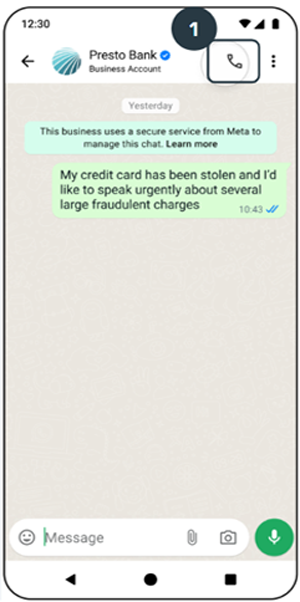
If voice testing is not being done, please disable the voice icon. Leaving it enabled without proper setup can lead to the WABA being flagged or banned by Meta.
To enable WhatsApp Voice, the business must be on a messaging tier higher than 2,000.
Prerequisites
From Tech Provider & Business:
-
Active WhatsApp phone number on Gupshup.
-
SIP Voice setup with PSTN calling support.
-
Audio Codec:
Opus/48000(mandatory for compatibility). -
Call Routing: Ensure seamless forwarding with no failures.
-
Firewall Configuration: No blocking of SIP or RTP traffic.
-
IP Whitelisting:
Location Signalling Backup Signalling Media Backup Media Brazil 54.207.112.105 NA 166.117.124.43 76.223.74.49 US-East 75.101.139.202
3.225.218.184
52.44.196.193 75.2.97.111 35.71.187.91 Europe Milan 51.118.5.102 18.102.137.179 15.197.143.73 99.83.227.74
Ensure your firewall allows traffic to/from ephemeral ports (
1024–65535).*
Step 1: Partner initiates enablement via Partner API with SIP configuration. Step 2: Gupshup forwards the request to Meta. Step 3: Meta responds:
- ✅ Success:
"Enable Voice - OK" - ❌ Failure: Error message with reason.
SIP Configuration Options
Basic SIP Call (No Registration)
- Scenario:
- This configuration is used for direct SIP calling without registration. The SIP endpoint sends INVITE messages directly to the destination without establishing a prior registration.
- Use cases:
- Direct SIP trunking between providers
- Anonymous SIP calls
- IP-to-IP direct calling
- Some wholesale VoIP scenarios
- Example:
{
  "host": "ip/domain",
  "port": "50X1"
}- No REGISTER messages are sent
- INVITE messages go directly to the destination
- Often used with IP-based authentication instead of user credentials
- May require specific firewall/NAT traversal handling
No REGISTER messages sent. INVITE goes directly. Used with IP-based authentication.
SIP Call With Authentication
- Scenario:
- Registration is disabled, but authentication is still required.
- This hybrid configuration is used when registration isn't needed but authentication is still required for outgoing calls. The SIP endpoint authenticates each INVITE rather than maintaining a registration.
- Registration is disabled, but authentication is still required.
- Use Cases:
- SIP peering arrangements
- Some SIP trunking scenarios
- Cases where registration is undesirable but security is needed
- Load balancer or proxy scenarios
- Example SIP Data
{
  "host": "ip/domain",
  "port": "50X1",
  "secret_key": "XXXXXXXX18fc94ac1488b86c0XXXXX"
}- The client will periodically re-register based on the expiration time
- Authentication uses SIP digest authentication (usually MD5)
Media Server Override
Overview
By default, the platform automatically assigns the media server based on the country associated with the WABA number.
The optional media_server parameter allows you to override the automatic media routing and assign the number to a specific media server.
This is useful when media traffic should always be routed through a particular region regardless of the WABA number's country.
Media Server Routing Logic
If the media_server parameter is provided, the specified media server is used.
If the parameter is not provided, the platform determines the media server using the following logic:
- Fetch the country associated with the WABA number.
- Check whether a country-to-media-server mapping exists.
- If a mapping exists, assign the corresponding country's media server.
- If no country mapping exists, fall back to the mapped continent media server.
- Assign the resolved media server.
Supported Media Servers
| Value | Description |
|---|---|
us | Routes media through the US media server |
brazil | Routes media through the Brazil media server |
milan | Routes media through the Milan (Europe) media server |
Configuration
{
  "host": "ip/domain",
  "port": "50X1",
  "media_server": "us"
}
Troubleshooting MatrixTroubleshooting Matrix
| Symptom | Likely Cause |
|---|---|
| No INVITE received | IP not whitelisted |
| INVITE received but no audio | RTP ports blocked |
| The call fails immediately | Opus missing |
| One-way audio | ICE issue |
| Some numbers work; others fail | IP whitelist incomplete |
TCP Transport Protocol Required
- Scenario
- This configuration forces TCP as the transport protocol instead of the default UDP. TCP is used when message reliability or larger message sizes are required.
- Use Cases
- Large SIP messages (many headers or SDP)
- Networks with UDP reliability issues
- Certain security requirements
- NAT traversal scenarios where TCP works better
- Example SIP Data:
{
  "username": "911XXXX258312",
  "host": "ip/domain",
  "port": "50X1",
  "secret_key": "XXXXXXXX18fc94ac1488b86c0XXXXX",
  "force_tcp": true
}- Uses SIP over TCP (RFC 3261)
- TCP provides reliable delivery, but with higher overhead
- The default SIP port remains 5060 (5061 for TLS)
- May require different keepalive mechanisms than UDP
- Often used as a fallback when UDP fails
SIP Configuration Metadata Format
[
  {
    "user": "911XXXX258312",
    "username": "911XXXX258312",
    "host": "ip-XX-232-3-XX.ap-XXX-1.compute.internal",
    "port": "50X1",
    "secret_key": "XXXXXXXX18fc94ac1488b86c0XXXXX",
    "force_tcp": false
  }
]| Parameter | Description | Type | Required | Default |
|---|---|---|---|---|
| user | Virtual SIP endpoint (user portion of SIP URI) | String | No | Dialed Number |
| username | SIP user or extension | String | No | Dialer Number |
| host | SIP server IP/domain | String | Yes | |
| port | SIP URI forward port | String | Yes | |
| secret_key | Password used for registration | String | No | Blank String |
| force_tcp | Whether to use TCP instead of UDP | Bool | No | false |
username@host:port : “sip:[email protected]:5071”. ( sip URI )
SIP INVITE Flow (For Incoming Calls)
+--------+         +----------+         +--------+
 | Caller |         |  SIP     |         | Callee |
 | Agent  |         |  Server  |         | Agent  |
 +--------+         +----------+         +--------+
     |                  |                     |
     |---- INVITE ----->|                     |
     |<-- 100 Trying ---|                     |
     |                  |---- INVITE -------> |
     |                  |<-- 180 Ringing ---- |
     |<-- 180 Ringing --|                     |
SIP works over Symmetric Response Routing — RFC3581
Sample SIP INVITE Payload
INVITE sip:[email protected]:5071;transport=udp SIP/2.0
Via: SIP/2.0/UDP 166.117.124.43:5072;rport;branch=z9hG4bKZ9Dv1vHpca4eB
Max-Forwards: 70
From: "9191XXXXX" <sip:[email protected]>;tag=v7KcK833m2e9m
To: <sip:[email protected]:5071;transport=udp>
Call-ID: e6176416-6a18-123f-8691-0affefd2ea23
CSeq: 109543747 INVITE
Contact: <sip:[email protected]:5072>
User-Agent: Gupshup-gs_sip/1.0
Allow: INVITE, ACK, BYE, CANCEL, OPTIONS, MESSAGE, INFO, UPDATE, REFER, NOTIFY, PUBLISH, SUBSCRIBE
Supported: timer, path, replaces
Allow-Events: talk, hold, conference, presence, as-feature-event, dialog, line-seize, call-info, sla, include-session-description, presence.winfo, message-summary, refer
Content-Type: application/sdp
Content-Disposition: session
Content-Length: 445
X-WV-FROM: +9191XXXXX
X-WV-TO: +55XXXXX
X-FS-Support: update_display,send_info
Remote-Party-ID: "9191XXXXX" <sip:[email protected]>;party=calling;screen=yes;privacy=off

v=0
o=Gupshup 1768158046 1768158047 IN IP4 166.117.124.43
s=Gupshup
c=IN IP4 166.117.124.43
t=0 0
m=audio 37032 RTP/AVP 102 8 103 126
a=rtpmap:102 opus/48000/2
a=fmtp:102 useinbandfec=1; maxaveragebitrate=20000; maxplaybackrate=16000; sprop-maxcapturerate=16000; ptime=20; minptime=10; maxptime=60
a=rtpmap:8 PCMA/8000
a=rtpmap:103 telephone-event/48000
a=fmtp:103 0-16
a=rtpmap:126 telephone-event/8000
a=fmtp:126 0-16
a=ptime:20
Media & RTP Requirements
- OPUS/48000 for codec, since the RTP clock rate is set at 48000 in SDP as per the RFC.
- Partners using Twilio can face some issues with their default support being for g711.
- fmtp can suggest maxaveragebitrate=20000;maxplaybackrate=16000;minptime=20;sprop maxcapturerate=16000;useinbandfec=1 , but with opus 48k
- DTMF coming through the RTP data stream.
- rfc4733 ; a=rtpmap:126 telephone-event/8000
- Symmetrical RTP Requirement
- rfc4961
- We send the Symmetric RTP Requirement
- Infra should allow symmetric RTP
- Ensures media flows through the same path as the signalling
- It will be expected that RTP packets to be sent from the same IP/port combination that was negotiated in SDP
GS-SIP Secure Media (SRTP) Configuration
Overview
GS-SIP supports secure media encryption using SRTP (Secure Real-time Transport Protocol).
When GS-SIP places outbound calls to your SIP infrastructure, your SIP server/trunk must correctly negotiate and respond to the SRTP offer.
- How to enable secure media
- Supported SRTP exchange protocols
- SIP/SDP expectations
- Required partner-side configurations
- Sample INVITE and SDP exchanges
Supported Secure Media Protocols
GS-SIP supports the following SRTP exchange protocols:
| Protocol | Description |
|---|---|
| DTLS | Uses DTLS-SRTP negotiation (Recommended) |
| SDES | Uses SDP Security Descriptions |
Enabling Secure Media
To enable SRTP and TLS during SIP configuration, pass the following parameters:
{
  "username": "911XXXX258312",
  "host": "ip/domain",
  "port": "50X1",
  "secret_key": "XXXXXXXX18fc94ac1488b86c0XXXXX",
  "is_secure": true,
  "srtp_exchange_protocol": "DTLS"
}
Configuration Parameters
| Parameter | Type | Description |
|---|---|---|
| is_secure | boolean | Set to true to enable SRTP and TLS |
| srtp_exchange_protocol | string | SRTP negotiation method (DTLS or SDES) |
What GS-SIP Sends
When SRTP is enabled, GS-SIP sends SIP INVITEs with secure RTP media profiles.
DTLS Flow
SDP Media Line
m=audio 34550 RTP/SAVPF 102 101DTLS SDP Attributes
a=fingerprint:sha-256 <certificate fingerprint>
a=setup:actpass
SDES Flow
SDP Media Line
m=audio 34550 RTP/SAVP 102 101SDES SDP Attributes
a=crypto:1 AEAD_AES_256_GCM_8 inline:<key>
a=crypto:2 AEAD_AES_256_GCM inline:<key>
a=crypto:3 AEAD_AES_128_GCM_8 inline:<key>
Partner Requirements
Your SIP infrastructure must:
- Support TLS transport
- Support SRTP negotiation
- Respond with matching SRTP parameters
- Return valid SDP in
200 OK - Accept secure RTP media profiles:
RTP/SAVPFRTP/SAVP
Required SIP Response
Your SIP server must respond with:
SIP/2.0 200 OKIncluding:
- Matching codec
- Matching SRTP profile
- Valid SDP security attributes
Example DTLS Response
m=audio 34708 RTP/SAVPF 102 101
a=fingerprint:sha-256 <partner fingerprint>
a=setup:active
Example SDES Response
m=audio 34246 RTP/SAVP 102 101
a=crypto:1 AEAD_AES_256_GCM_8 inline:<key>
Supported Codecs
GS-SIP currently supports:
| Codec | Details |
|---|---|
| Opus | 48kHz stereo |
| Telephone Event | DTMF events |
Example:
a=rtpmap:102 opus/48000/2
a=rtpmap:101 telephone-event/48000
TLS Requirements
When is_secure=true:
- TLS signaling is automatically enabled
- SIP communication occurs over TLS transport
- SIP URI example:
sip:number@host:5071;transport=tlsICE Support
GS-SIP supports ICE attributes for media negotiation.
Example:
a=ice-ufrag:<value>
a=ice-pwd:<value>
a=candidate:<candidate details>
Call Flow Summary
DTLS Flow
GS-SIP INVITE
    ↓
Partner SIP Server
    ↓
100 Trying
    ↓
200 OK with DTLS fingerprint
    ↓
ACK
    ↓
Secure RTP Media Established
SDES Flow
GS-SIP INVITE
    ↓
Partner SIP Server
    ↓
100 Trying
    ↓
200 OK with crypto attributes
    ↓
ACK
    ↓
Secure RTP Media Established
Validation Checklist
Before enabling production traffic, ensure:
- TLS enabled on SIP trunk
- SRTP supported
- Correct port exposure
- Matching codec support
- Proper SDP handling
- DTLS fingerprints handled correctly
- SDES crypto lines supported (if using SDES)
Troubleshooting
Common Issues
No Audio
Possible causes:
- RTP blocked by firewall
- Incorrect SRTP negotiation
- ICE candidate issues
Call Disconnects After Answer
Possible causes:
- Invalid SDP response
- Unsupported crypto suite
- DTLS negotiation failure
488 Not Acceptable Here
Possible causes:
- Unsupported RTP/SAVP profile
- Codec mismatch
- Missing crypto attributes
Recommendation
DTLS is the recommended SRTP exchange protocol due to:
- Better security
- Dynamic key exchange
- Improved interoperability
Recommended configuration:
{
  "is_secure": true,
  "srtp_exchange_protocol": "DTLS"
}
Important Notes
- Secure media requires TLS signaling
- Partner infrastructure must support SRTP
- GS-SIP validates SDP security negotiation
- Unsupported SRTP negotiation may result in call failure
Billing Events API (Sample Payload)
{
  "call": {
    "id": "wacid.XXXXXXXXXXXXX",
    "to": "16315XXX601",
    "from": "16315XX3602",
    "event": "terminate",
    "direction": "incoming",
    "timestamp": 1671644824,
    "status": "Completed",
    "start_time": 1671644824,
    "end_time": 1671644944,
    "duration": 120
  },
  "phone": "780XXX7021",
  "conversationType": "CALL",
  "isGsBilling": true,
  "appId": "269a4153-XXX-4590-XXXX-6e2e937836e4",
  "billable": true
}
WhatsApp Media Flow (README)
A common symptom of this issue is that the WhatsApp user hears the business audio with a 1–2 second delay. For example, if an IVR plays “1-2-3,” the user may hear it 1–2 seconds after answering the call.
To reduce this delay, we expect the customer system (partner SIP) to send the Answer SDP (200 OK) as quickly as possible after receiving the initial INVITE.
Gupshup uses an “optimistic accept” strategy. This means we pre-start the media setup before receiving the 200 OK. By the time the 200 OK arrives, the media path is already ready and audio starts immediately.
This behaviour follows RFC 8839.
Without Optimistic Accept
+---------+           +----------+           +---------+
| WhatsApp|           | Gupshup  |           | Partner |
| Agent   |           | Server   |           |  SIP    |
+---------+           +----------+           +---------+
     |                     |                     |
     | INCOMING CALL       |                     |
     |-------------------->|  INVITE             |
     |                     | ------------------->|
     |                     |                     |
     |                     | 100 Trying          |
     |                     |<--------------------|
     |    Initialize MEDIA |                     |
     |<--------------------|                     |
     |--------MEDIA------->|                     |  // Call timer starts
     |                     |                     |  // but no audio yet
     |                     |    (late) 200OK     |
     |                     |<--------------------|
     |    START MEDIA      |                     |
     |<--------------------|                     |
     |                     |                     |
     |                     | -------MEDIA------->|
With Optimistic Accept (Recommended)
+---------+           +----------+           +---------+
| WhatsApp|           | Gupshup  |           | Partner |
| Agent   |           | Server   |           |  SIP    |
+---------+           +----------+           +---------+
     |                     |                     |
     | INCOMING CALL       |                     |
     |-------------------->|  INVITE             |
     |                     | ------------------->|
     |                     |                     |
     |    Initialize MEDIA |                     |
     |<--------------------|                     |
     |                     |                     |
     |                     |   (early) 200OK     |
     |                     |<--------------------|
     |    START MEDIA      |                     |
     |<--------------------|                     |
     |--------MEDIA------->|                     | // No delay
     |                     | -------MEDIA------->|
Media IPs
Media will originate from these IPs:
- 166.117.124.43
- 76.223.74.4
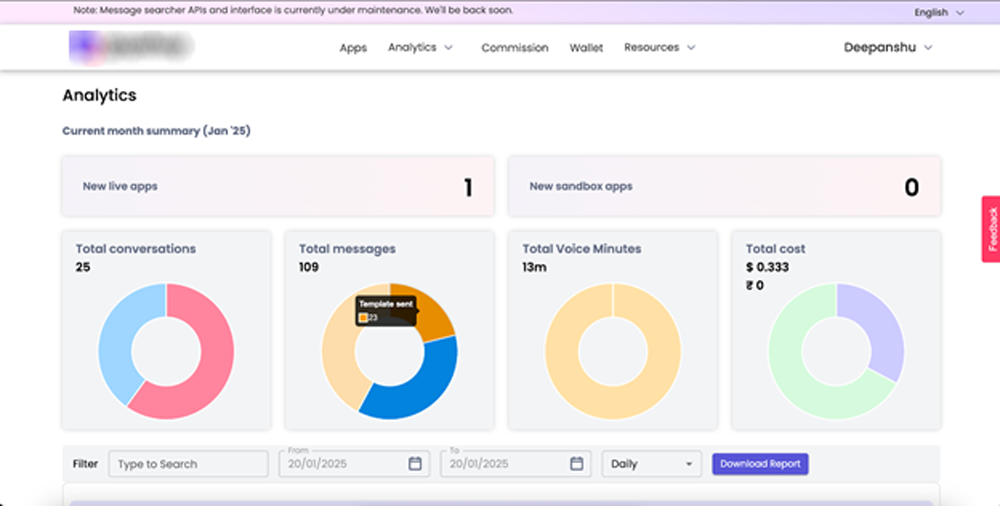
Voice Analytics
Available on Partner Analytics Dashboard. Only incoming call events and duration are shown.
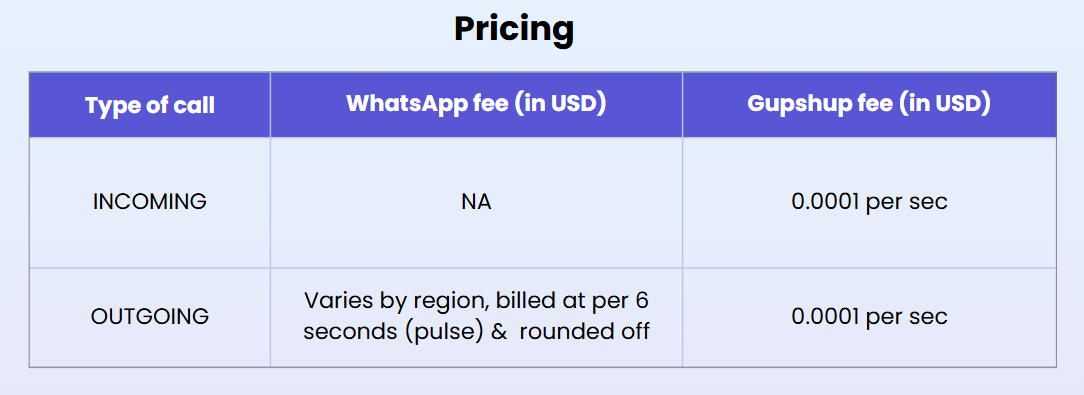
OUTGOING CALL (Business initiated) (Tier-based pricing for higher than 50,000 call minutes per month will also be available from Meta. Check here)
Please check the WhatsApp voice calling rates.
Updated about 2 months ago