
Permanent Call Permissions for WhatsApp Voice
1. Overview
Permanent call permission allows a business to make voice calls to WhatsApp users without requesting temporary permission each time.
Earlier, businesses could only place calls after users granted temporary permission.
With permanent permissions, users can choose to always allow calls from a business.
This is especially useful for businesses with frequent or critical voice interactions — e.g. delivery agents, logistics, customer service, or support follow-ups.
2. Objective
The main goal of permanent permission is to:
- Improve user experience by reducing repetitive approval requests.
- Enable instant voice communication when users opt-in once.
- Ensure privacy and consent compliance — users still control call access.
- Streamline business workflows for operations like delivery tracking or support.
3. How It Works
-
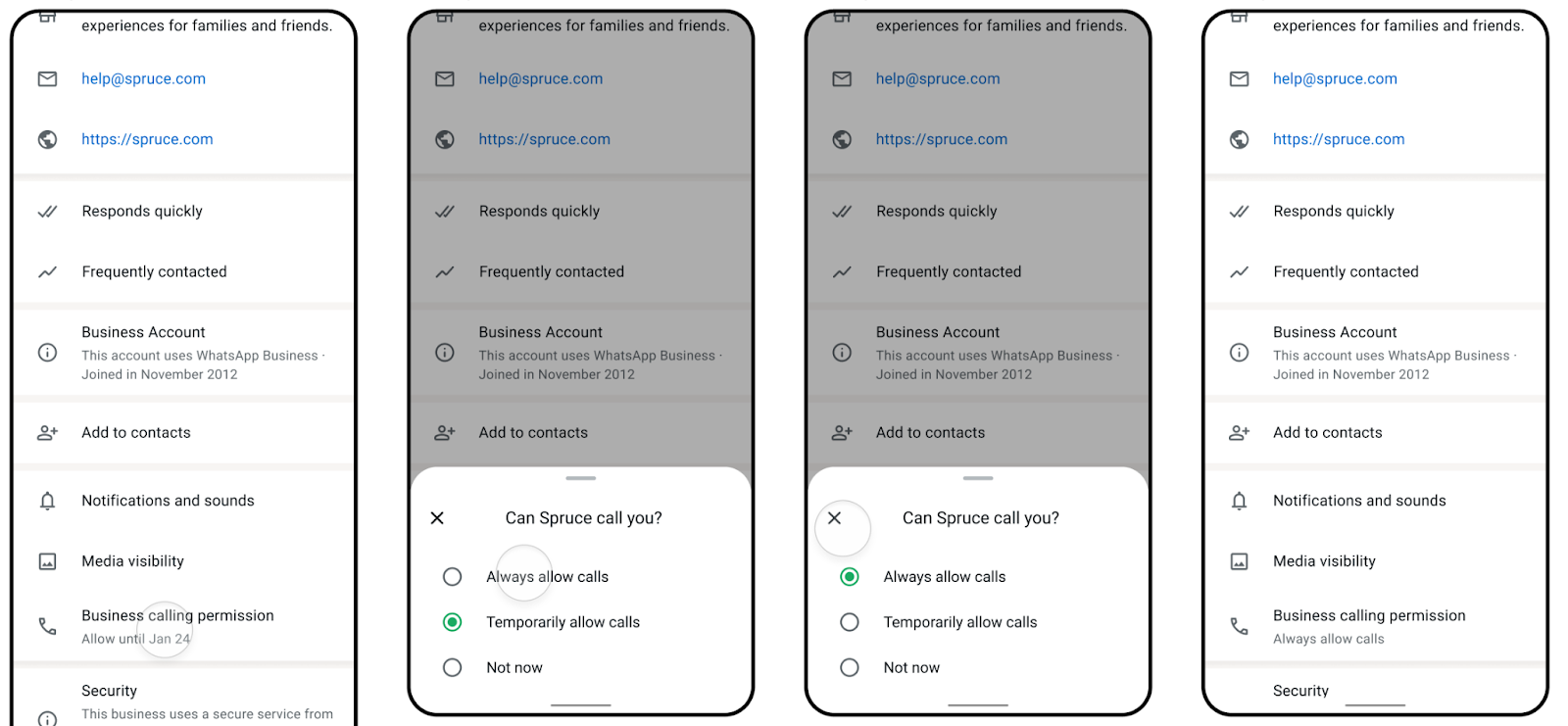
User Consent
Businesses send a Call Permission Request (CPR) message through WhatsApp.
The user sees options such as:- Allow calls → grants permanent permission
- Temporarily allow → grants permission for 7 days
- Not at this time → rejects permission
-
Permanent Permission Stored
Once the user taps Allow calls, their choice is stored permanently, allowing calls anytime without asking again. -
Webhook Event Confirmation
Meta sends a webhook event confirming the user’s response:is_permanent: true→ permanent access grantedexpiration_timestamp→ temporary permission
-
Call Handling
Businesses can then make voice calls using the WhatsApp Cloud API.
4. Permission States
| State | Description |
|---|---|
no_permission | User hasn’t set any call preference yet |
temporary | User has granted temporary permission (expires after 7 days) |
permanent | User has permanently allowed calls from the business |
5. Partner API Reference
The same API is used for both temporary and permanent permissions — only the webhook response differs.
📘 Partner API — Send Call Permission Request
POST https://partner.gupshup.io/partner/app/{appId}/v3/messageHeaders
Authorization: {{PARTNER_APP_TOKEN}}
Content-Type: application/json
Body Example
{
  "messaging_product": "whatsapp",
  "recipient_type": "individual",
  "to": "91XXXXXXXXXX",
  "type": "interactive",
  "interactive": {
    "type": "call_permission_request",
    "action": { "name": "call_permission_request" },
    "body": { "text": "We would like to call you to support your query." }
  }
}
Webhook Response — Permanent Permission
"interactive": {
  "call_permission_reply": {
    "is_permanent": true,
    "response": "accept",
    "response_source": "user_action"
  },
  "type": "call_permission_reply"
}
Webhook Response — Temporary Permission
"call_permission_reply": {
  "expiration_timestamp": 1759836840,
  "response": "accept"
}
Visual Flow Diagram
sequenceDiagram
    participant User
    participant Business
    participant WhatsApp Server

    Business->>User: Sends Call Permission Request (CPR)
    User-->>WhatsApp Server: Selects "Allow Calls"
    WhatsApp Server-->>Business: Webhook Response (is_permanent: true)
    Business->>User: Initiates Voice Call (no further consent needed)
6. Limitations
- User must still approve once via the permission request message.
- User can revoke permission anytime from WhatsApp settings.
- Temporary permission expires after 7 days.
- Maximum 5 connected calls per user–business pair per 24 hours.
- Permissions are specific to the WhatsApp Business number.
- No API contract changes — same endpoints are used.
7. Benefits
- No repeated permission requests.
- Faster and more reliable voice communication.
- Better user experience and engagement.
- Reduced latency in business-to-user calls.
8. Summary
| Aspect | Details |
|---|---|
| Feature Name | Permanent Call Permission |
| Introduced By | Meta (WhatsApp Cloud API) |
| Purpose | Allow users to give long-term consent for voice calls |
| Permission Types | Permanent, Temporary (7 days), No Permission |
| Setup | Requires user consent via CPR message |
| Webhook Indicator | is_permanent: true |
| API Change | None – uses existing endpoints |
| Ideal For | Logistics, customer service, frequent call scenarios |
9. Key Notes
- This feature aligns with Meta’s WhatsApp Cloud API documentation on user call permissions.
- It enhances the business-to-user calling workflow by introducing a one-time, permanent opt-in mechanism.
Updated 5 months ago