
Linking Gupshup.ai apps with Partner
Gupshup.ai App Linking & Partner Linking
Effective dates:16 September 2026: New security controls and new linking methods become available. These are backward compatible and existing methods will continue to work.
31 October 2026: Existing App ID + App-level API Key app linking method will be deprecated.
This guide explains the existing and new ways to link customer apps with Gupshup partners, the security controls available to partners, the new token-based linking methods, authentication requirements, and the migration path from legacy linking methods.
1. Overview
Gupshup.ai is introducing more secure mechanisms for linking customer apps with partners, along with additional security controls for existing partner-linking methods.
Key changes
-
Partner ID-based linking continues for existing use cases, but partners can:
- Disable automatic approval of linking requests.
- Completely disable Partner ID-based linking.
-
App ID + Account-Level API Key-based app linking is being deprecated on 31 October 2026.
-
Two new, more secure linking mechanisms are available:
- Partner Linking Token
- App Linking Token
-
New linking APIs support:
- Partner Tokens
- Universal Tokens
-
New linking methods do not support Gupshup.ai account-level or app-level API keys/tokens.
-
Customer App Tokens and Account Secrets in self-serve apply only to apps that are not linked to a partner. Once an app is linked to a partner, generation of new Customer App Tokens will not be allowed.
2. What Is Changing
The overall direction is to move partner linking away from:
- Shared application credentials
- Automatically trusted Partner IDs
- Manual credential sharing
and toward:
- Partner-controlled approval
- Token-based linking
- Partner-side validation
- Partner Tokens / Universal Tokens for API authentication
Recommended direction
Customer creates app
        ↓
Secure linking token
        ↓
Linking request
        ↓
Partner validation
        ↓
Approve / Reject
3. Existing Linking Methods
3.1 Partner ID-Based Linking
Current flow
A customer can create an app on Gupshup.ai and enter a partner's Partner ID to initiate linking.
Historically, the request was automatically approved and the app became linked to the partner.
Security Control 1 — Disable Auto-Approval
Recommended for all partners.
Partners can turn off automatic approval of Partner ID requests.
Go to:
Partner Portal
→ Settings
→ App Linking
→ Disable "Auto-approve Partner ID requests"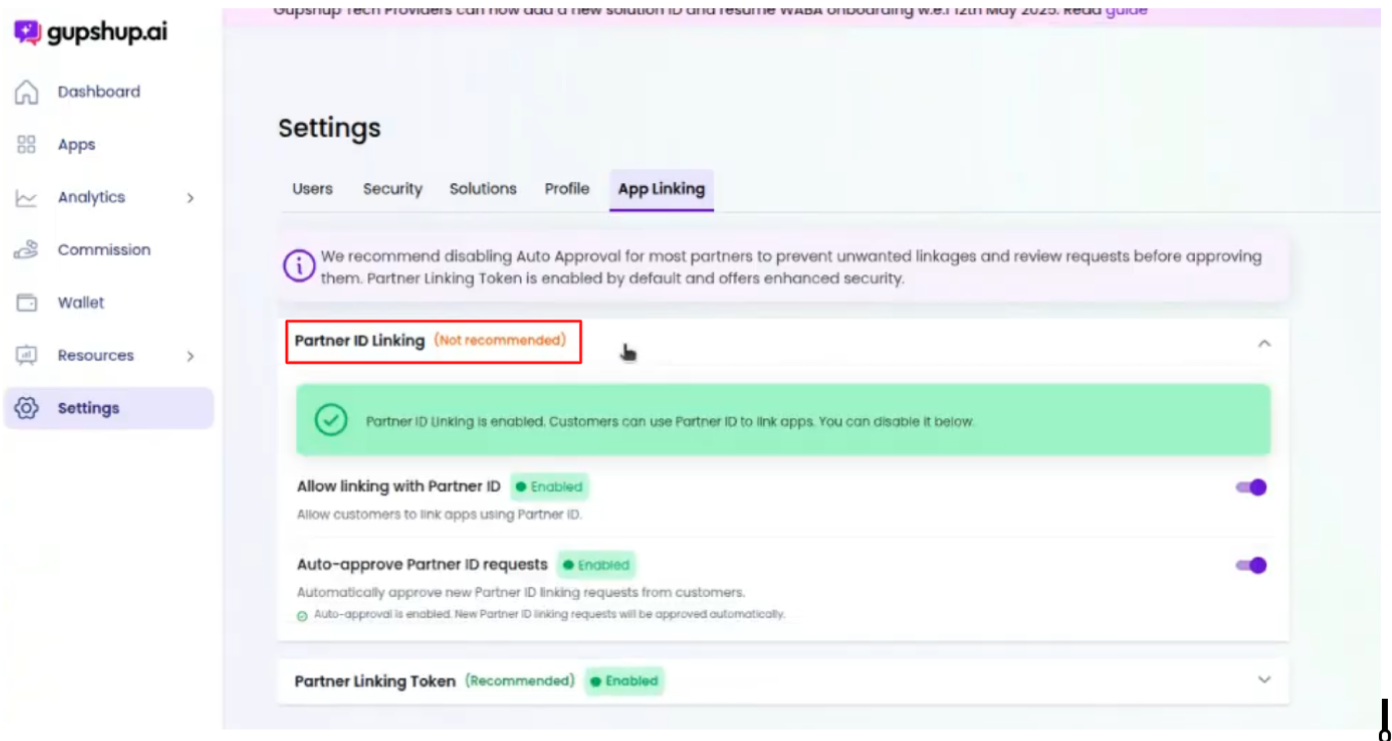
After auto-approval is disabled
- The customer initiates linking using the Partner ID.
- A linking request is created.
- The partner receives the request. (check API docs)
- The partner can Approve or Reject the request. (check docs)
- Approval/rejection can be done:
- Through the Partner Portal UI (by any user)
- Through the available APIs
Requests are also available under:
Apps
→ App linking requests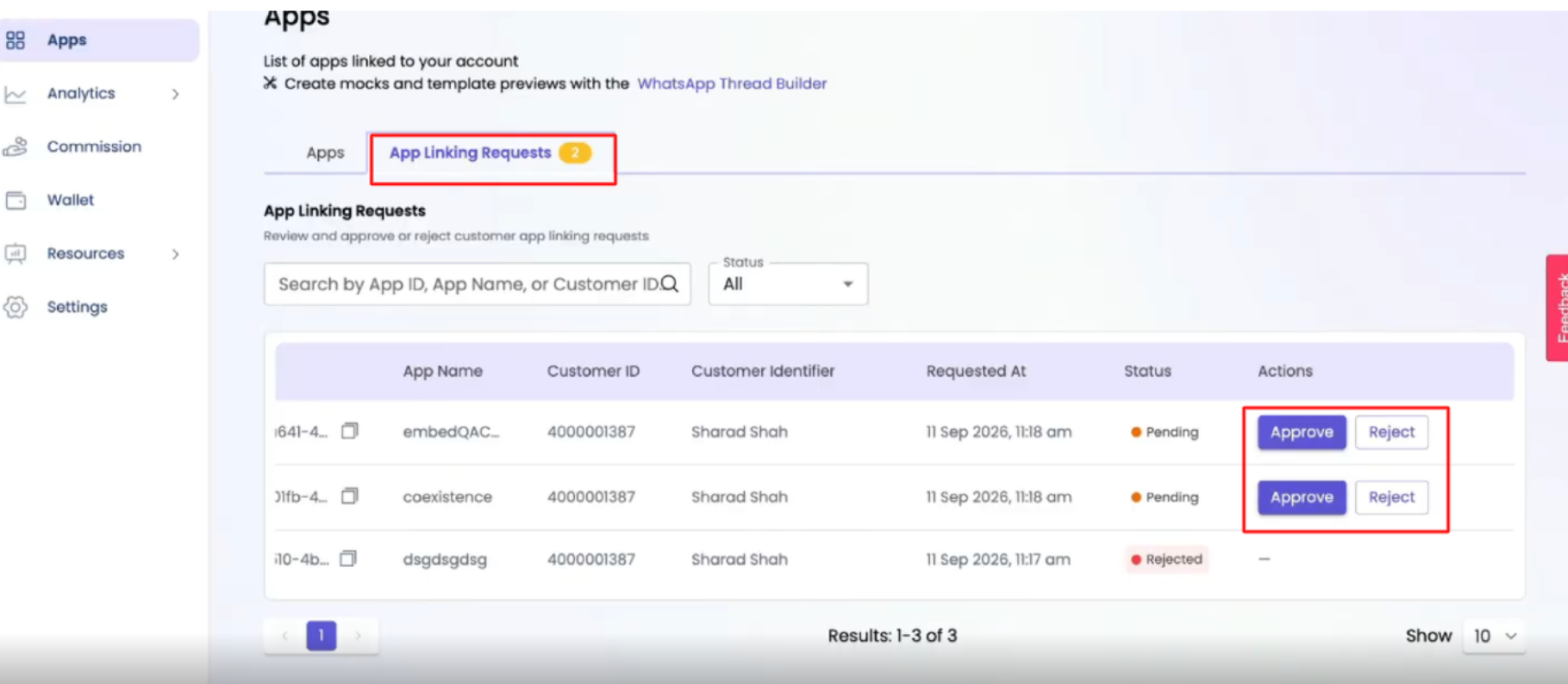
API authentication
The request APIs can be authenticated using:
- Partner Tokens
- Universal Tokens
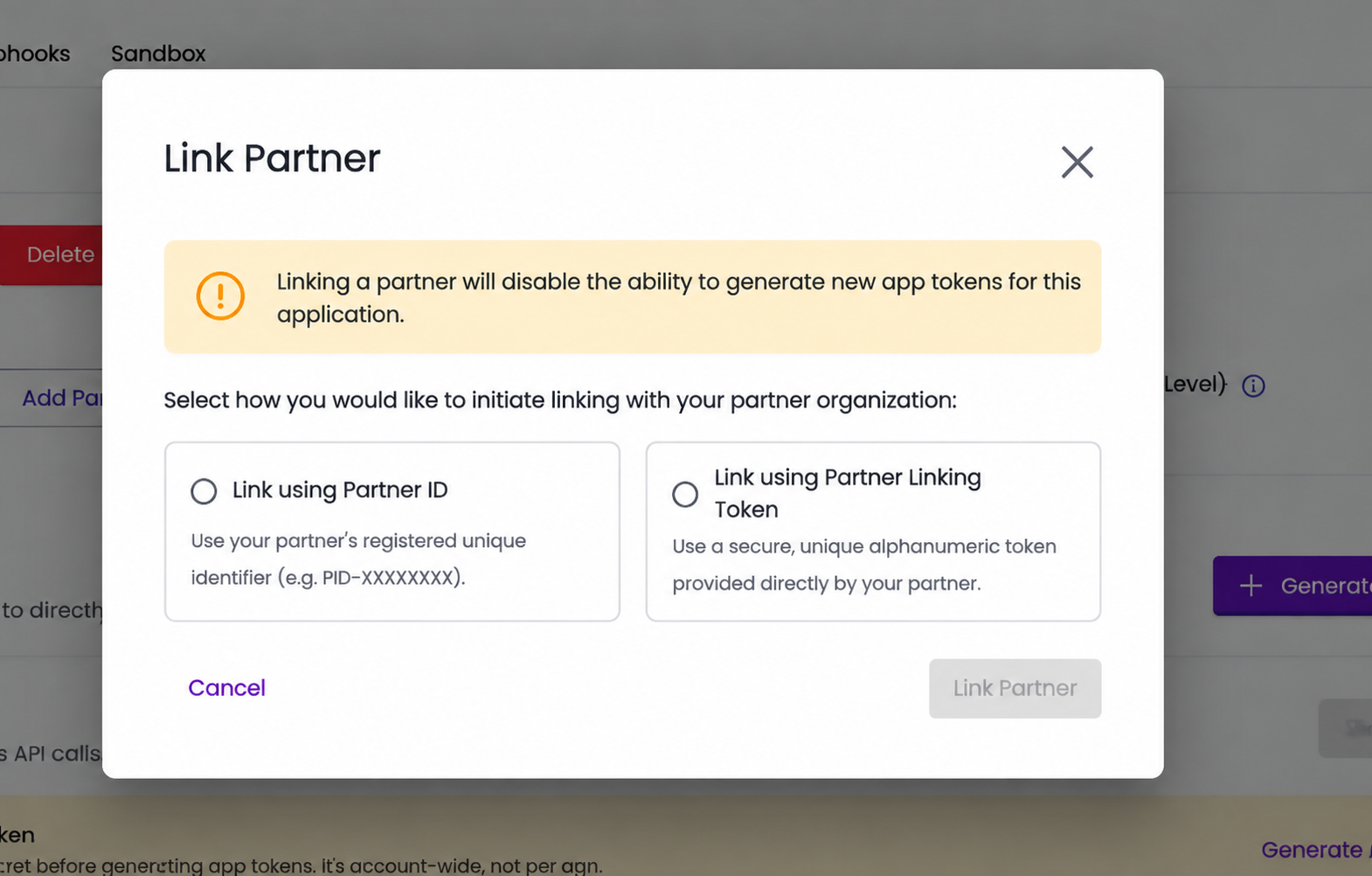
Users on gupshup.ai - on clicking ‘Add partner ID’ will now see 2 options as below. To continue with the old process they must select ‘Link using partner ID’
Security Control 2 — Disable Partner ID Linking Completely
Recommended for partners who do not have apps on Gupshup.ai and want to move completely to token-based linking.
Go to:
Partner Portal
→ Settings
→ App Linking
→ Disable "Allow linking with partner ID"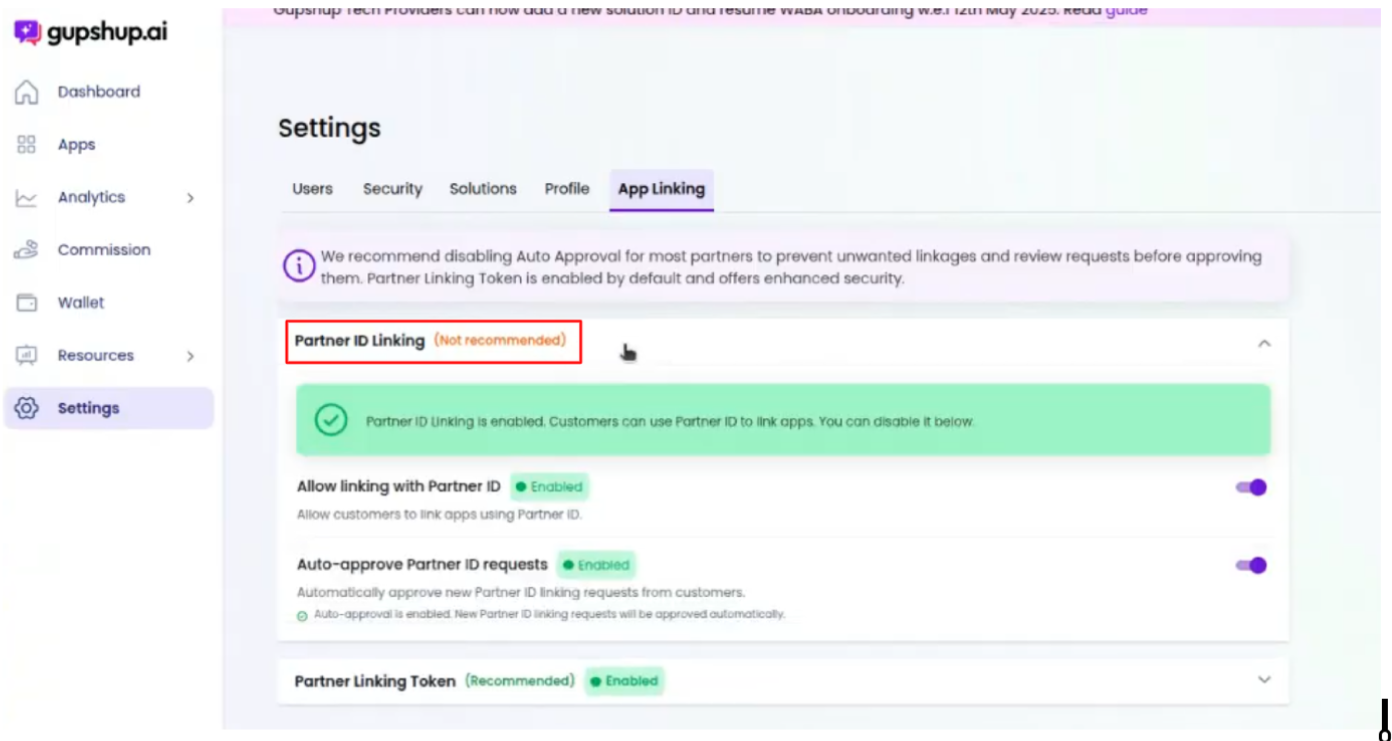
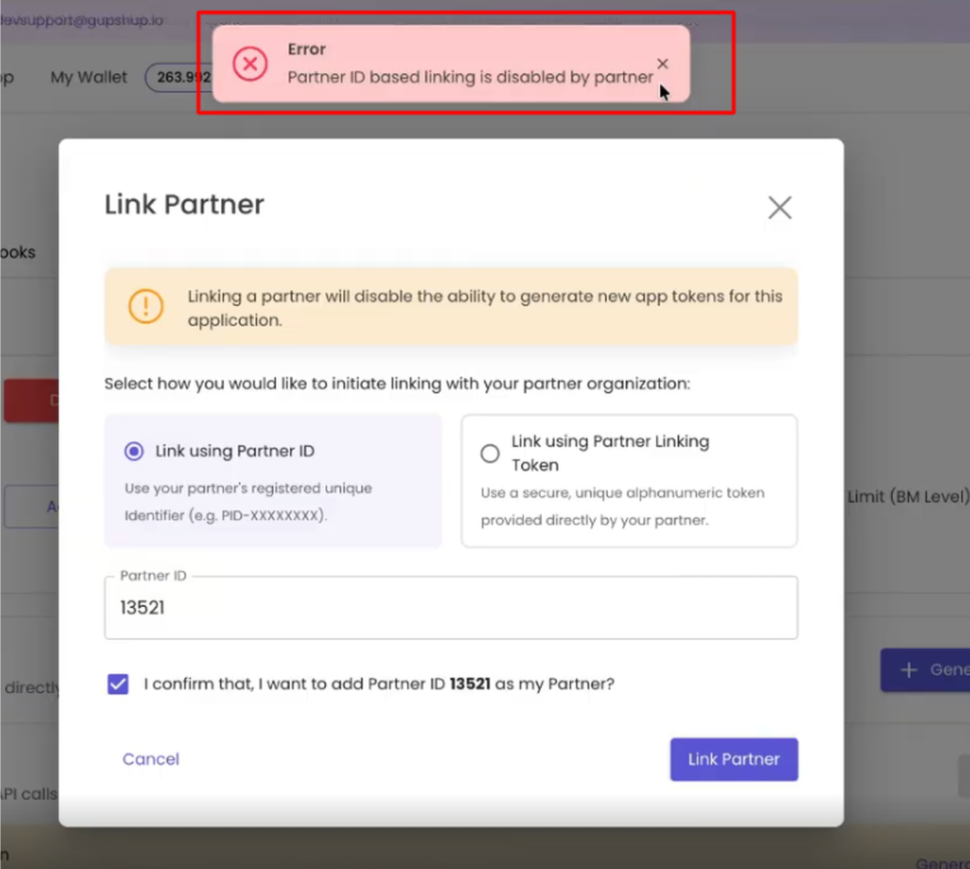
When this is disabled, customers cannot use the Partner ID mechanism to establish a link.
Gupshup.ai user will see the below error if you disable the toggle.
Recommended direction
Use one of the secure token-based methods instead:
- Partner Linking Token
- App Linking Token
3.2 App ID + Account-Level API Key
Current flow
The legacy flow requires the partner to have:
- App ID
- Account-level API Key
The customer shares these application credentials with the partner.
Why this is being deprecated
The source guide identifies the following security concerns:
- Customers have to share their App ID and API credentials.
- There is no two-sided authentication of the app owner.
Deprecation
App ID + Account-Level API Key app linking will be deprecated on 31 October 2026.
Partners using this method should migrate to a secure token-based mechanism.
4. New Linking Methods
There are two new secure linking mechanisms:
- Partner Linking Token
- App Linking Token
4.1 Partner Linking Token
What is it?
Instead of sharing a simple Partner ID, a partner can generate a Partner Linking Token.
The token is:
- A complex alphanumeric value
- Valid for 30 days
- Regeneratable after expiry
- Supported through APIs for regeneration
Note that a provision for secondary tokens to work in parallel with primary tokens is under development.
Where to generate it
a. Through APIs
API to generate or regenerate Partner Linking token
API to get Partner Linking token details
b. Through the Portal
Partner Portal
→ Settings
→ App Linking
→ Partner Linking Token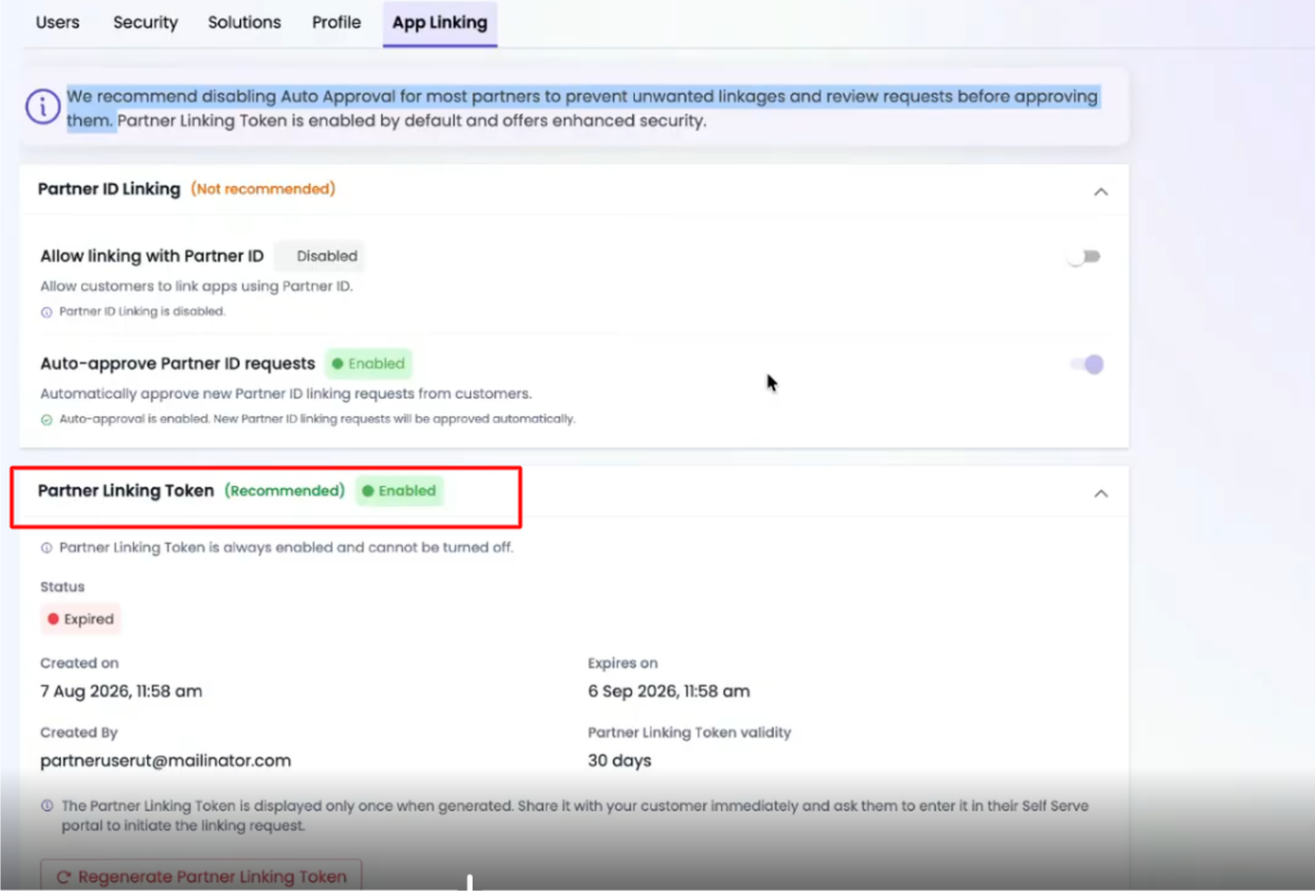
Partners can generate a new token every 30 days and include it in their customer onboarding documentation.
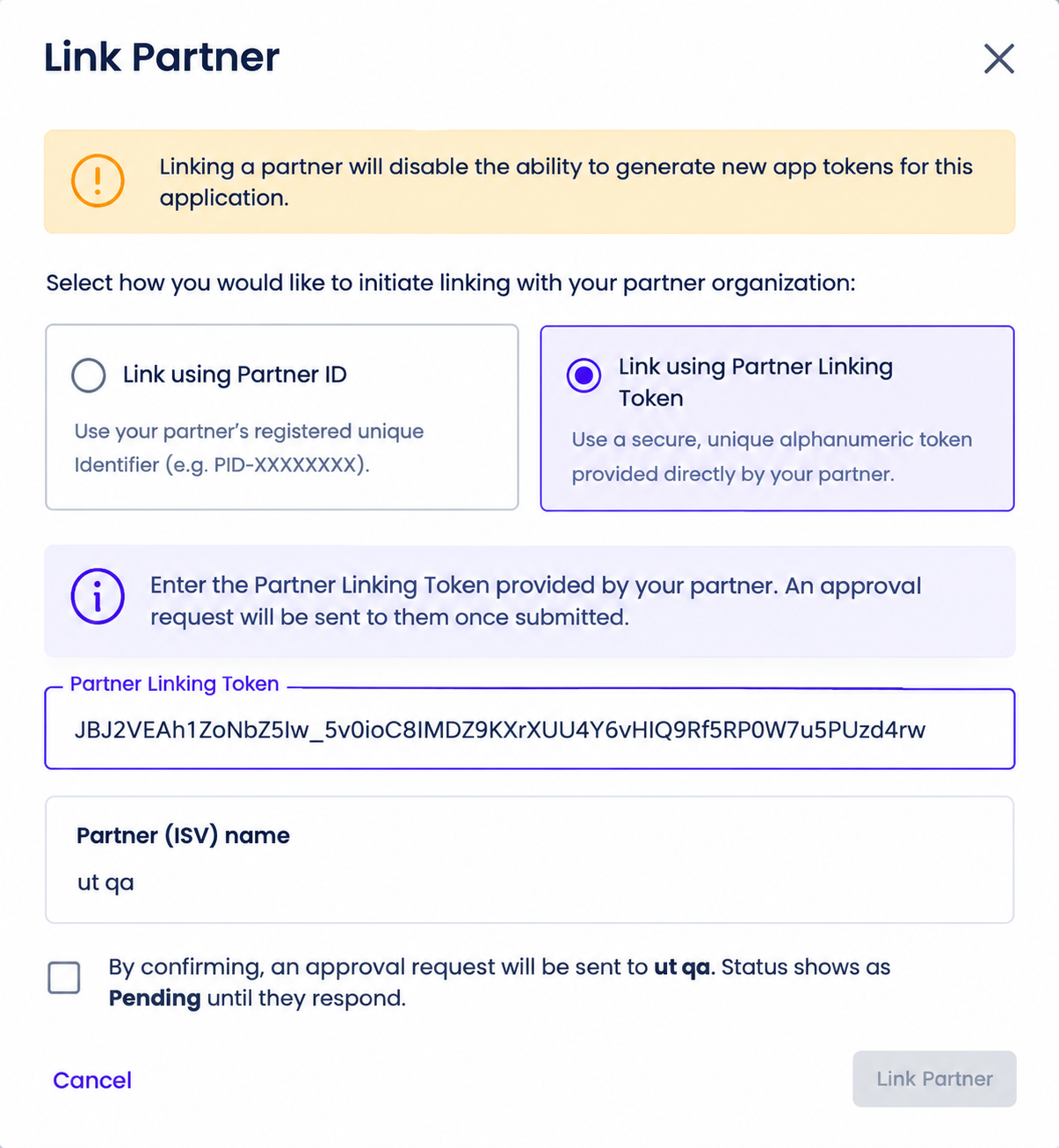
Customer flow
- Customer goes to Gupshup.ai.
- Customer opens the Link a Partner flow.
- Customer chooses:
- Link with Partner ID
- Link with Partner Token
- Customer selects Link with Partner Token.
- Customer enters the Partner Linking Token provided by the partner.
- Customer submits the linking request.
Partner flow
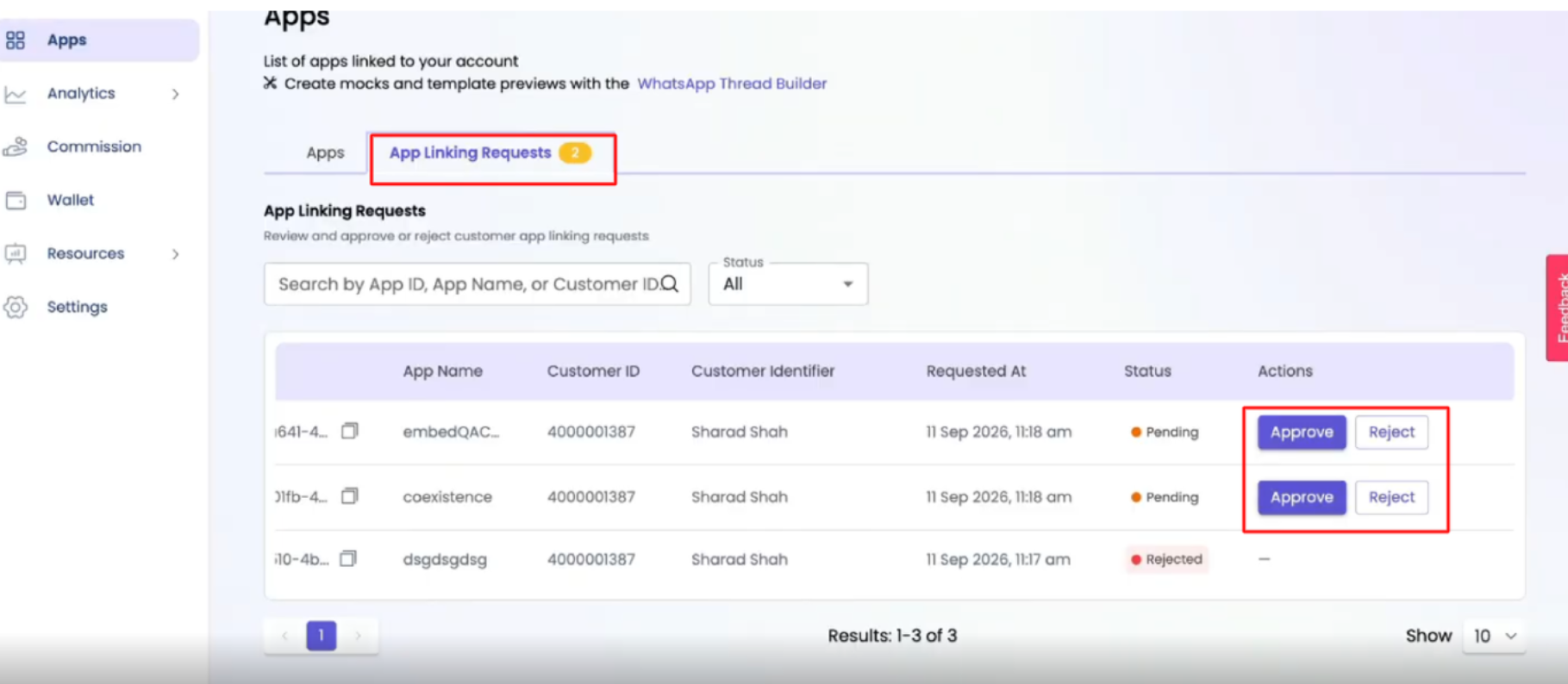
The partner receives the linking request and can:
- View the request in the Partner Portal
- Pull the request through APIs (check docs)
- Approve the request (check docs) (by any user)
- Reject the request
Requests are also available under:
Apps
→ App linking requests
The APIs support:
- Partner Tokens
- Universal Tokens
Request identifiers
The linking request provides identifiers such as:
- Customer ID
- User email
- Username
Partners can use these identifiers for internal validation before approving the request.
Example validation
A partner can verify that the Customer ID belongs to an existing customer in its own system before approving the linking request.
Recommended use case
Use Partner Linking Token when:
- Customers create their own apps on Gupshup.ai.
- Those customers need to link the apps to a partner.
- The partner wants a more secure replacement for Partner ID-based linking.
Recommended replacement: Partner Linking Token should be the preferred replacement for Partner ID-based linking for new customer onboarding.
4.2 App Linking Token
What is it?
The App Linking Token is designed for cases where the customer should not share:
- App ID
- API Key
- Account credentials
with the partner.
Customer flow
- Customer goes to Gupshup.ai.
- Customer generates an App Linking Token.
- Customer shares the token with the partner.
Partner flow
The partner receives the App Linking Token and uses the available API with:
- App Linking Token
- Partner authentication
The app is then linked to the partner.
Read API docs
Key advantage
The customer does not need to share:
- App ID
- Account-level API Key
with the partner.
This provides a more secure way for the customer to initiate linking without exposing application credentials.
Recommended use case
Use App Linking Token when:
- Customers currently create apps on Gupshup.ai.
- Customers currently share App ID/API Key with the partner.
- The existing credential-sharing flow needs to be migrated.
The source guide recommends migrating those customers from the legacy App ID + API Key flow to the App Linking Token flow.
5. Authentication for New APIs
All new linking APIs support:
- Partner Tokens
- Universal Tokens
They do not support:
- Account-level API Keys
- App-level API Keys
- App-level API tokens
Recommendation
Ensure all integrations using the new linking APIs are authenticated with the appropriate:
Partner Token
        OR
Universal Token
6. Partner-Specific Recommendations
Scenario A — Partner creates and manages its own apps
If the partner uses Gupshup.ai to create an app and then links it to its Partner ID:
Recommended actions
- Disable automatic approval for Partner ID linking.
- Integrate the request-polling APIs (check docs) or monitor the Partner Portal.
- Validate the Customer ID against the partner's own systems.
- Approve only requests belonging to the expected customer base. (check docs) (by any user)
This keeps the existing Partner ID workflow while adding partner-side validation.
Scenario B — Partner currently uses app linking APIs
The existing onboarding API-based approach will be deprecated by 31 October 2026.
The recommended target flow is:
Customer / App Creation
        ↓
Partner Linking Request
        ↓
Partner Validation
        ↓
Partner Approval
Scenario C — Customers create apps and link using Partner ID
For customers creating apps on Gupshup.ai and linking them with a Partner ID:
Do not rely on automatic approval.
Partners should:
-
Disable auto-approval.
-
Validate incoming requests.
-
Move new implementations to Partner Linking Token through APIs or the Portal.
Recommended flow
Customer
   ↓
Partner Linking Token
   ↓
Linking Request
   ↓
Partner Validation
   ↓
Approve / Reject
Scenario D — Customers currently share App ID + API Key
Legacy flow
Customer
   ↓
App ID + API Key
   ↓
Partner
   ↓
App Linked
Recommended flow
Customer
   ↓
App Linking Token
   ↓
Partner API
   ↓
App Linked
Customers no longer need to share their App ID or API key with the partner.
Read API docs
7. Customer App Token & Account Secret Changes
Customer App Tokens and Account Secrets in self-serve apply only to apps that are not linked to a partner.
Once an app is linked to a partner:
- Existing applicable controls continue according to platform rules.
- Generation of a new Customer App Token is not allowed.
Therefore, customers who intend to work through a partner should use the partner-linking mechanisms instead of relying on Customer App Tokens or Account Secrets.
8. Quick Decision Guide
| Partner situation | Recommended approach |
|---|---|
| Partner creates its own apps on Gupshup.ai | Partner ID linking with auto-approval disabled + request validation |
| Customers create apps and link using Partner ID | Migrate to Partner Linking Token |
| Customers share App ID + API Key | Migrate to App Linking Token |
| Default recommended behaviour | Disable auto-approval and use request APIs / Portal |
| Partner does not want Partner ID linking | Disable Partner ID linking and use Partner Linking Token / App Linking Token |
| Partner needs customers to share credentials | Avoid credential sharing; use App Linking Token |
Updated 24 days ago