
Direct Send by Meta
Direct Send for Utility Messages (without creation of templates)
Overview
Direct Send is a WhatsApp messaging capability that enables businesses to send Utility messages without the need to manually create and manage WhatsApp templates beforehand. The feature simplifies onboarding and message delivery by automatically handling template generation and matching in the background.
Direct Send is designed to accelerate time-to-market for businesses that need to send transactional and utility communications such as order updates, payment confirmations, appointment reminders, shipping notifications, and account-related alerts.
Pre-requisites
Direct Send is now available to eligible businesses meeting Meta’s requirements, including businesses with a messaging tier of approximately 100,000 messages. The earlier manual whitelisting requirement is being removed as eligibility is handled through Meta.
Supported on Gupshup V3 session endpoints only (passthrough)
How It Works
You can send a Utility message through Direct send by -
MANDATORY OPTION 1 : Send the desired body as a session message
OR MANDATORY OPTION 2 : Additionally / alternatively Send just the template name in the session message
MANDATORY : Pass the category as ‘Utility’
OPTIONAL : Additionally or alternatively, Define a Template Name for the body in the request
OPTIONAL : Additionally, Pass TTL for the message (not at a template level)
Finally, when this kind of message is sent -
- If a matching template name is found, the message goes through as that particular template. You get the same template ID in the DLR along with the category as ‘Utility’
- If there is no name or a different name, but a matching template body is found, the message goes through as that particular template. It may not be an exact word-to-word match. You get the same template ID in the DLR along with the category as ‘Utility’
- If no matching template name and body exists, Direct Send also uses predefined Meta onboarding templates as a fallback to ensure message delivery. (These are standard utility templates across businesses). A new template name and ID is created, which will be reusable for future use. You get that template ID in the DLR along with category as ‘Utility’
- The Direct Send algorithm may even add variables and update the templates if minor changes are done in the body next time.
- This template practically also goes for approval; however the approval webhook may or may not get triggered accurately in this phase from Meta.
This approach removes the operational overhead of manually creating, submitting, and managing templates while maintaining compliance with WhatsApp’s template requirements.
Supported Use Cases
Direct Send supports business-initiated Utility messaging, including:
- Order confirmations and shipment updates
- Payment confirmations and receipts
- Appointment reminders
- Service notifications
- Account-related alerts
- Transactional customer communications
Authentication messages are NOT supported at the moment.
Marketing messages are not supported.
Key Benefits
- No manual template creation required.
- Lesser recategorization issues
- Faster onboarding and deployment.
- Reduced operational effort for template management.
- Automatic template generation and reuse.
- Support for interactive Utility messaging.
- Improved scalability for high-volume transactional communications.
- Visibility into generated templates, delivery performance, and analytics.
Supported Message Types
Direct Send supports:
- Text messages
- Interactive messages with URL Call-to-Action (CTA) buttons
- Interactive messages with Reply buttons
- Mixed interactive messages containing both CTA and Reply buttons
- Image, Video, and Document headers (subject to feature access enablement)
- Custom Message Time-to-Live (TTL)
Message Format Limits
Direct Send aligns with the message length limits supported on templates for business-initiated messages. The following length restrictions exist:
● Body text: 1024 characters
● Header: 60 characters
● Footer: 60 characters
● Button text: 20 characters
The number of buttons allowed is:
● Quick reply buttons allowed: 10 (max)
● CTA buttons allowed: 2 (max)
Message throughput
Direct Send functionality is designed to support the standard Cloud API throughput.
Template Management
Templates generated through Direct Send are automatically created and maintained by the platform.
Two template generation approaches are supported:
- Auto-generated templates based on message content.
- Named templates where a business provides a template name, allowing future messages to be consistently associated with the same template.
Generated templates are visible in WhatsApp Manager and reporting systems but cannot be edited or deleted manually.
Pricing
- Sending a message with category Utility will be charged at utility rates.
Technical Implementation
SENDING MESSAGE
- Messages are sent using the Gupshup V3 session endpoint.
-
A new category parameter is used to indicate the message type:
- Utility
- When the category field is absent from the API payload, it follows the existing send behavior
- If the category parameter is omitted, normal Cloud API message behavior applies.
- Direct Send supports configurable message TTL (Time-to-Live), allowing businesses to define how long a message should remain eligible for delivery.
- Businesses can optionally provide a
template_nameto improve message attribution and template consistency. - Standard Cloud API message status webhooks continue to be supported, with additional template attribution information available for Direct Send messages.
SAMPLE PAYLOAD FOR SENDING UTILITY THROUGH PARTNER V3 SESSION MSG ENDPOINT WITHOUT NAMED TEMPLATE
` {
"messaging_product": "whatsapp",
"recipient_type": "individual",
"to": "<WHATSAPP_USER_PHONE_NUMBER>",
"type": "text",
"text": {
"<BODY_TEXT>"
,
"category": "utility" // —----> REQUIRED FOR UTILITY  "ttl_seconds": 600, —--------------> OPTIONAL`

`} `
TTL (time to live)
You can configure TTL when calling the messages endpoint by adding the field "ttl_seconds" below the "category" field, then providing a TTL value in seconds as shown in the payload above.
TTL defaults and limits
● Default value: 30 days
● Min customizable value: 30 seconds
● Max customizable value: 43200 (12 hours)
SAMPLE PAYLOAD FOR SENDING UTILITY THROUGH PARTNER V3 SESSION MSG ENDPOINT WITH NAMED TEMPLATE
{
"messaging_product": "whatsapp",
"recipient_type": "individual",
"to": "<WHATSAPP_USER_PHONE_NUMBER>",
"type": "text",
"text": {
"body": "Hi Jane, your order #12345 has been shipped and is expected to arrive on March 20."
},
"category": "utility",
"direct_send_config": { —--------> NEW
"template_name": "order_shipment_update" —---------> NEW
}
}
SAMPLE RESPONSE - SAME AS THE SESSION MESSAGE
{
  "messages": [
    {
      "id": "{{GUPSHUP_MESSAGE_ID}}"
    }
  ],
  "messaging_product": "whatsapp",
  "contacts": [
    {
      "input": "{{DESTINATION_PHONE_NO}}",
      "wa_id": "{{DESTINATION_PHONE_NO}}"
    }
  ]
}
SAMPLE STATUS WEBHOOK ON SENDING DIRECT UTILITY
{
    "entry": [
        {
            "changes": [
                {
                    "field": "messages",
                    "value": {
                        "contacts": [
                            {
                                "user_id": "IN.36029935196650449",
                                "wa_id": "xxxxxxxxxx"
                            }
                        ],
                        "messaging_product": "whatsapp",
                        "metadata": {
                            "display_phone_number": "xxxxxxxxx",
                            "phone_number_id": "xxxxxxxxx"
                        },
                        "statuses": [
                            {
                                "biz_opaque_callback_data": "xxxxxxxxx",
                                "conversation": {
                                    "id": "1befb47665ea14862755201cexxx2d8",
                                    "origin": {
                                        "type": "utility"
                                    }
                                },
                                "gs_id": "06f335fd-xxxxx-41b1-af02-4737c0b66481",
                                "id": "033Li2zvkFs3BxxxxxxT0mG",
                                "meta_msg_id": "wamid.HBgMxxxxxxgSRUEzQkNGOTUwRDBFQjhCMUM5AA==",
                                "pricing": {
                                    "billable": true,
                                    "category": "utility", —----------> NEW VALUE
                                    "pricing_model": "PMP",
                                    "type": "regular"
                                },
                                "recipient_id": "xxxxxxxx",
                                "recipient_user_id": "IN.xxxxxx",
                                "status": "delivered",
                                "template_id": "xxxxxxxxxxx", —----------> NEW
                                "timestamp": "1783419176"
                            }
                        ]
                    }
                }
            ],
            "id": "xxxxxxxxxxx"
        }
    ],
    "gs_app_id": "45725f2c-xxxxxx25-4cda78bd1a6c",
    "object": "whatsapp_business_account"
}
VIEWING TEMPLATES
- The templates generated by Direct Send are named starting with “auto_generated” , unless you have provided a specified name in the send message request payload.
- You cannot edit or delete templates generated by the Direct Send API. Note: This restriction applies to both auto-generated templates and business named templates created via direct_send_config.
- They are identified using a new field called source with value AUTO_GENERATED.
View generated templates via API
When calling the Get Template List endpoint query source for AUTO_GENERATED as below, all Direct Send templates (message-content-based or template-name-based) templates will be returned:
{
"data": [
{
"name": "auto_generated_text_e22a3ec4_7c4a_4097_ae40_56ed1e89941c",
"parameter_format": "POSITIONAL",
"components": [
{
"type": "BODY",
"text": "Hi{{1}},Your order is delivered.",
"example": {
"body_text": [
[
"sample 1"
]
]
}
}
],
"language": "en_US",
"status": "APPROVED",
"category": "UTILITY",
"correct_category": "UTILITY",
"source": "AUTO_GENERATED",
"id": "1951933648908188"
}
...
],
"paging": {
"cursors": {
"before": "MAZDZD",
"after": "MjQZD"
}
}
}
Helpful Links
Analytics and Reporting
Businesses can track performance and analytics for Direct Send messages using existing reporting capabilities. Generated templates are available within WhatsApp Manager and can be analyzed similarly to standard WhatsApp templates.
When you use Direct Send, message templates are generated for you automatically.
If you already use templates today, you will notice these new generated templates both in WhatsApp Manager and through API calls to get your available templates.
- The templates generated by Direct Send are named starting with “auto_generated”(in you havent provided the name in send message request) and they are identified using a new field called source with value AUTO_GENERATED.
- You cannot edit or delete templates generated by the Direct Send API.
- Note: This restriction applies to both auto-generated templates and business named templates created via direct_send_config.
On the Gupshup Partner track, here will be the impact -
- The billing events will reflect Utility category and thus will be billable if outside the customer service window
- The Wallet Statements will reflect WhatsApp fee and Gupshup fee same as it shows for Utility message
- The Partner Portal reporting will also reflect Direct Send as Utility Message Volume and respective cost.
View generated templates in WhatsApp Manager
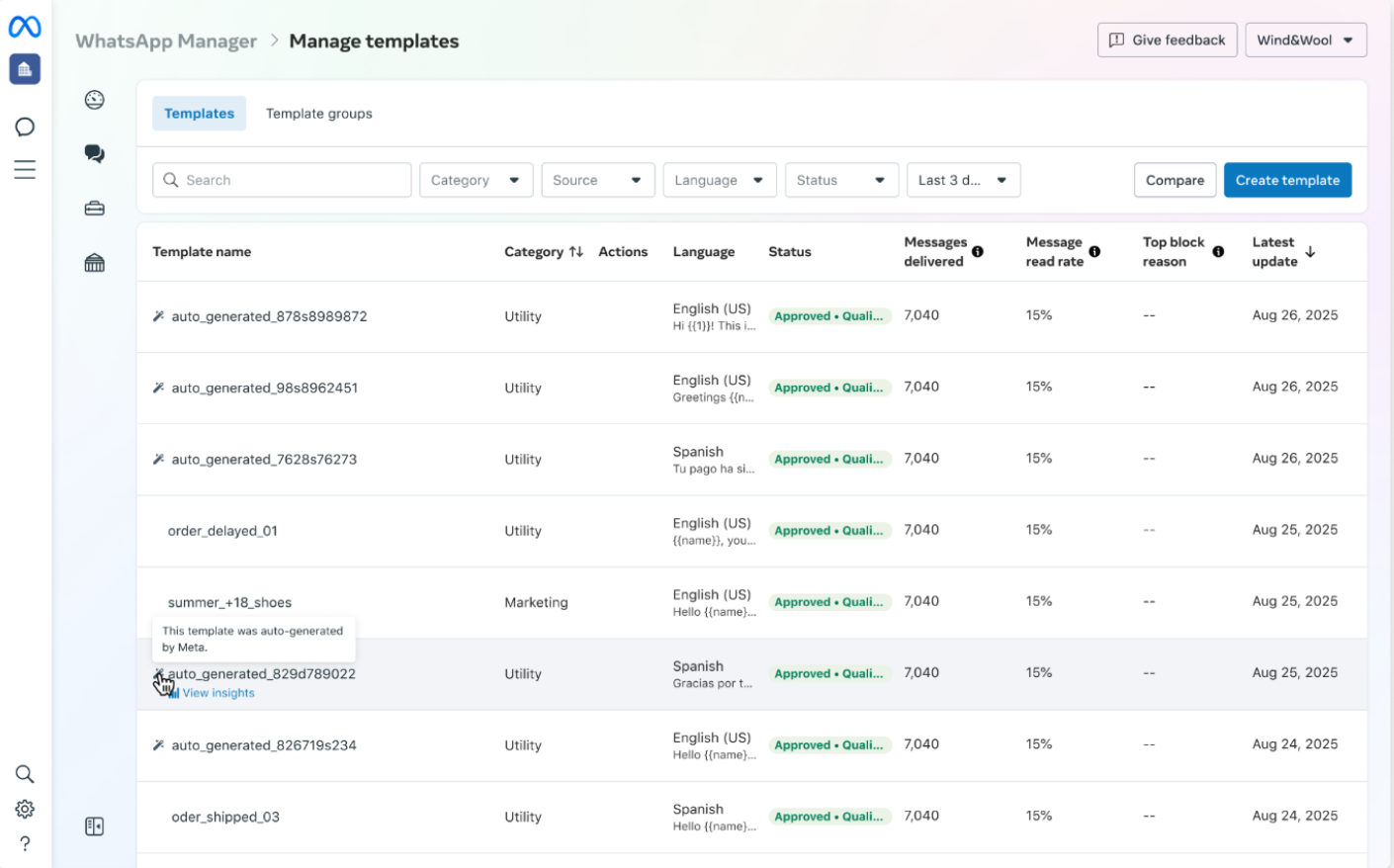
Templates created by Direct Send will be visible in WhatsApp Manager. There is an indicator per row to indicate a Direct Send template being auto-generated by Meta.
Filters
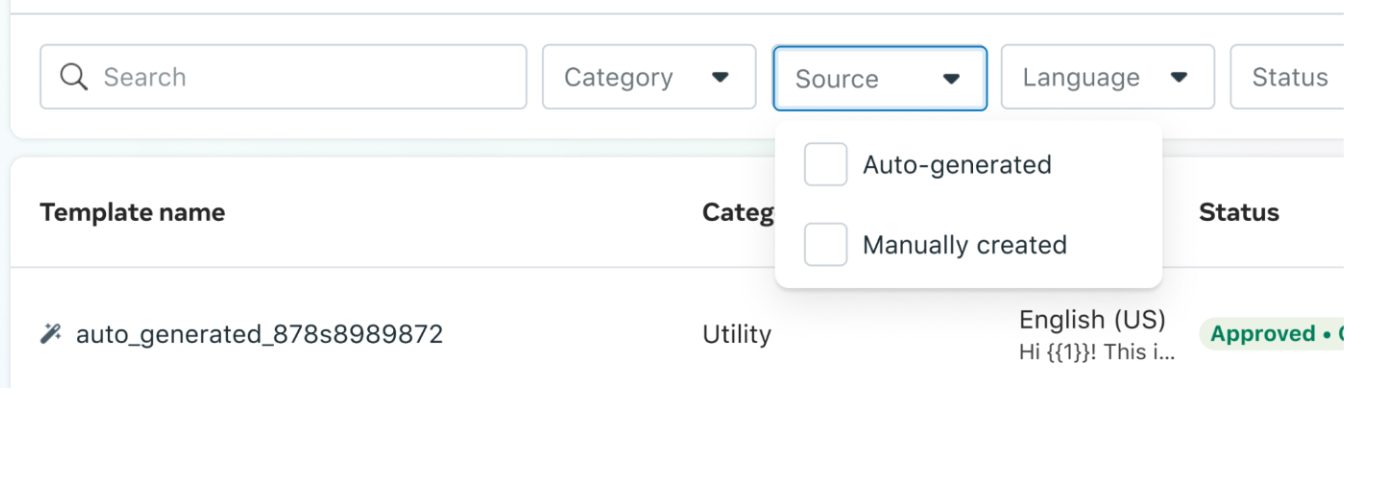
A filter will be shown on WhatsApp Manager if your business has both Direct Send (auto-generated) and manually created templates.
View insights and analytics
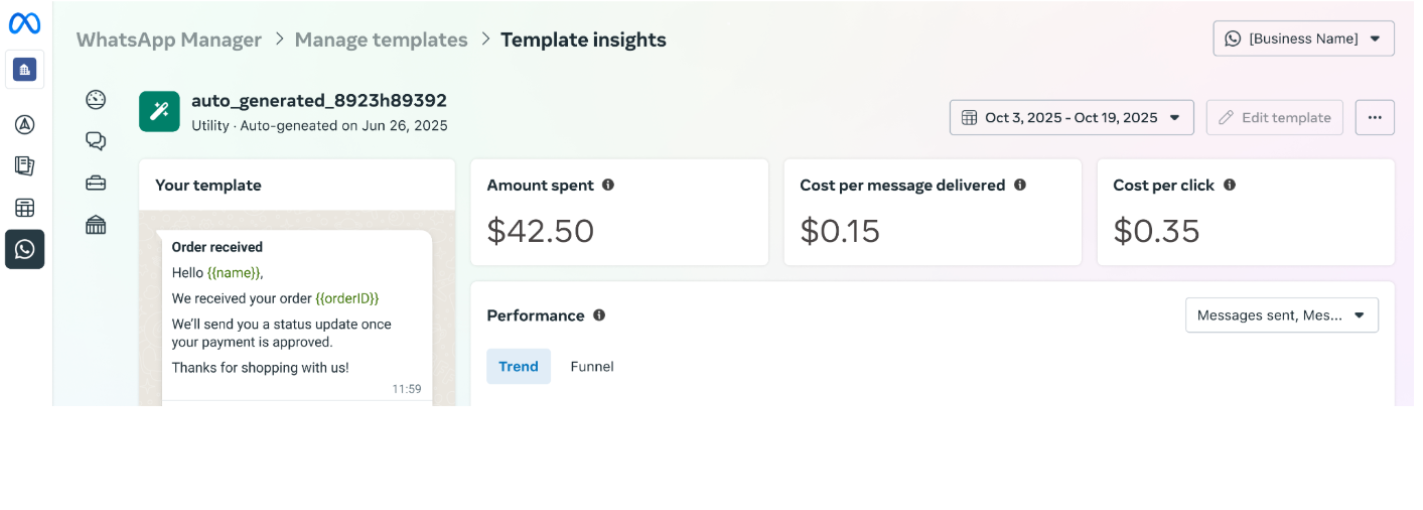
Via WhatsApp Manager
1. Navigate to WhatsApp Manager > Manage Templates
2. Hover over the generated template, then click View insights
Getting Started
- Confirm that the WABA’s messaging tier is above 100,000, then use Direct Send through the Gupshup V3 session endpoint.
Support
- Reach out to your regional CSM
Troubleshooting as shared by Meta
Failure response
Messages configured with TTL can fail for a few reasons: JSON JSON
● You try to use TTL on a message other than a Direct Send message.
● The TTL expired before the message could be delivered.
● The given TTL value was either too high or too low.
If you experience errors when sending a Direct send message with a TTL configured, use the table below to troubleshoot:
| Case | Response |
|---|---|
| Attempt to configure TTL on a non-Direct Send message | We will throw error code 100 “Invalid parameter” if you provide a TTL value for a message send that does not use the Direct Send API. |
| Message undeliverable within TTL | Messages that are unable to be delivered within the default or customized TTL are dropped. |
| TTL value is too large | We will throw error code 100 “Invalid parameter” if the TTL value you provided is more than 43200 seconds (12 hours). |
Integrity and content guidelines
Template Pausing
When using the Direct Send API, if you attempt to send a message that matches a template which is paused due to being flagged as low quality, the message will fail and you will receive an error code in a webhook response. The same restrictions that apply to user created templates are also applied to Direct Send generated templates. Please refer to Meta Template pausing dev docs for templates pausing and unpausing details..
When a Direct Send template is paused, they notify through email and webhooks. The template status webhook should be subscribed to be able to get the fastest update on a template being paused.
To avoid template restrictions, businesses should:
1. Send the message only to the users who are expecting the message
2. Design the content such that the message is expected. For example, a standard opt-out message or appointment reminder
Webhook for notification of template pausing
They also notify using emails and webhooks when the template status changes to Paused. You should subscribe to the Template Status webhook in order to monitor status changes when they occur.
Error while sending a paused template on Direct Send API
When you attempt to send a message that matches a template that is paused due to low quality on the Direct Send API, the message will fail and you will receive a specific error code in the webhook response.
Example webhook response:
"code": 132015,
"title": "Template is temporarily unavailable to use because it was paused due to low quality."
Template Categorization
The Direct Send API is currently limited to utility messages only, and Meta actively monitors how messages are categorized in adherence Meta’s Template Guidelines. If Meta identifies that a business is sending a marketing message through Direct Send, the business will be notified. Persistent misuse of Direct Send to send non-compliant messages will result in restrictions to Direct Send access.
Notification any time we detect non-compliant content on new messages
Meta will send an email any time marketing or authentication content is detected on messages sent using Direct Send. Businesses are encouraged to reach out to – Gupshup for review. We will give them more details.
The goal is to give the business an opportunity to address any messages with content that is not meeting the Meta’s Template Guidelines before restrictions are enforced. The business can then request to review the classification with Meta and resolve the issue.
Note:
1. While the review is in progress, no immediate disruptions are expected.
2. Once review is complete and it is established the messages are out of compliance and it’s deemed to be marketing, we have two options:
a. Offboard the use case from Direct Send since it does not meet category guidelines.
b. Revise the content and resume sending
Webhook for notification of category misuse
Subscribe to the template_correct_category_detection webhook field to receive notifications about messages being sent through Direct Send that have been identified as category misuse. You can ingest the template_id which are the templates identified for category misuse.
Account restrictions for persistent category misuse
Persistent misuse of Direct Send to send non-compliant messages will result in increasingly restricted access to Direct Send features, with the potential of complete revocation of Direct Send access.
1. Stage 1 – Misuse Detected (No Restriction): The business is notified of the misuse. The business can email support at gupshup and attempt to resolve the issue.
2. Stage 2 – Continued Misuse (7-Day Restriction): If misuse continues after notification, a 7-day restriction is applied. The WhatsApp Business Account will be unable to use the Direct Send API for utility messaging during this period.
3. Stage 3 – Continued Misuse After 7-Day Restriction (30-Day Restriction): If misuse persists after the 7-day restriction, a 30-day restriction is imposed. The WABA will be unable to use Direct Send for 30 days. This serves as a final warning before permanent removal from the Direct Send Beta.
4. Stage 4 – Continued Misuse After 30-Day Restriction (Permanent Revocation): If misuse continues after the 30-day restriction, Direct Send access will be permanently revoked.
Webhook for notification of account restriction
Ensure that you are subscribed to the account_update field so that you can receive notifications about account restrictions for Direct Send based on category misuse. Listen for the "event" of ACCOUNT_RESTRICTION and "violation_type" of DIRECT_SEND_UTILITY_TEMPLATE_ABUSE
For warning strikes, the Violation type will look like
"violation_type" : "DIRECT_SEND_UTILITY_CATEGORY_ABUSE_WARN" // or "DIRECT_SEND_UTILITY_TEMPLATE_ABUSE"
For strikes with 7-day ban or 30-day ban or permanent ban, the Violation type will look like
"changes": [
{
"value": {
"event": "ACCOUNT_RESTRICTION", None
"violation_info": {
"violation_type" : "DIRECT_SEND_UTILITY_CATEGORY_ABUSE_STRIKE_1" / "DIRECT_SEND_UTILITY_CATEGORY_ABUSE_STRIKE_2" / "DIRECT_SEND_UTILITY_CATEGORY_ABUSE_OFFBOARD""
},
"restriction_info": {
"restriction_type": "RESTRICTED_DIRECT_SEND_UTILITY_TEMPLATES",
"expiration": <expiration_timestamp>
}

When the ban is lifted, the Violation type will look like
"changes": [
{
"value": {
"event": "ACCOUNT_RESTRICTION",
"violation_info": {
"violation_type" : "DIRECT_SEND_UTILITY_CATEGORY_ABUSE_UNBAN"
}
If you attempt to send messages during a restriction period, they synchronously return an error message (139200)
Error Code Message
{
"error": {
"message": "(#139200) Direct Send Utility access is blocked",
"type": "OAuthException",
"code": 139200,
"error_data": {
"messaging_product": "whatsapp",
"details": "Direct Send Access is restricted: Direct send messaging capability is not available for this WABA right now due to misclassification based enforcements."
},
Updated 28 days ago